

PC Repair Cost in Edmonton: Prices and What Drives Them
Common PC repairs in Edmonton typically range from about $39 to $468 CAD, and the fault type decides where a specific bill lands within that range. A repair quote also reflects the device's design, the parts it needs and the time required to diagnose and fix it.
If your computer has slowed down, stopped charging or developed a cracked screen, a generic price list can help you set a budget, but it can't tell you what your particular machine needs. The useful question isn't only “What does PC repair cost?” It's whether the confirmed repair is worth paying for compared with replacing the computer, and what the final estimate includes.
Typical PC Repair Costs at a Glance
Edmonton laptop repairs for common problems are reported at approximately $69–$239 CAD overall, but individual jobs can fall outside that range. A RAM upgrade may be relatively straightforward, while replacing a screen can cost several hundred dollars. The table shows reported Edmonton ranges alongside wider Canadian benchmarks where one is available. The Edmonton laptop repair pricing guide attributes local pricing about 7% above the national average to local labour and parts costs.
Typical PC repair costs by repair type (CAD)
| Repair | Edmonton range (CAD) | Wider Canadian benchmark (CAD) |
|---|---|---|
| RAM upgrade | $39–$156 | No benchmark listed |
| Cooling-system work | $39–$117 | No benchmark listed |
| Battery replacement | $62–$195 | No benchmark listed |
| Keyboard replacement | $78–$234 | No benchmark listed |
| Charging-port repair | $62–$195 | $100–$250 |
| Screen replacement | $117–$468 | $150–$500 |
| Motherboard repair or replacement | No Edmonton range listed | $300–$700 |
Low-complexity upgrades and maintenance can cost under $150, while screen work and board-related faults can approach several hundred dollars. These are guide ranges, not a promise that every model can be repaired for the same amount. A tightly assembled laptop, a hard-to-source screen or a fault that affects more than one component can change both labour and parts costs.
Start by matching the symptom to the closest repair type, then use that range to set a practical budget. Before authorising work, request a quote for the exact make and model, with parts and labour identified separately. A range gives you a starting point; diagnosis turns it into a decision you can compare with the cost of replacement.
What Makes a PC Repair Cost Rise or Fall
A PC repair bill has several layers, and the balance between them changes with the fault. Diagnosis is the time spent finding the cause. Some providers charge for this before work begins, and the fee may or may not be credited toward an approved repair, so ask how it works before booking.
Labour covers the technician's time and skill. The Government of Canada Job Bank's Alberta wage information for computer repair technicians lists hourly wages of $17.00 at the low end, $28.00 at the median and $47.19 at the high end. A customer-facing service price must also account for travel, dispatch, diagnostic equipment, administration, warranty handling and business overhead. For Alberta network technicians, the median wage is $38.67 an hour, one reason that network, server and security work shouldn't be priced like a simple software fix.
At Nerds 2 You Edmonton, hourly labour is $95 for Windows computers and $110 for Apple and Linux devices or networking services. Completed repairs have a minimum one-hour labour charge; after the first hour, additional labour is billed in 15-minute increments. Replacement parts are charged separately from labour, and advertised rates exclude GST.

How the fault changes the bill
A replaceable battery or RAM module usually means a parts charge plus a shorter labour job, provided the computer is designed to allow access. A fault involving shared circuitry can take longer to isolate, so diagnosis and labour may grow before anyone can identify which part, if any, should be replaced. Parts can also differ in price and availability by model; original-equipment and compatible components aren't necessarily interchangeable in cost or availability.
For Windows repairs, Nerds 2 You Edmonton charges labour at its hourly rate, with required parts listed separately. Some laptop models need different labour pricing, so the exact model matters when estimating a particular repair.
Ask before approving: Is diagnosis included, is it credited toward the repair, and are travel, parts and GST shown separately?
A clear written quote should make those layers visible. Use the written estimate steps in the final section to compare the proposed work with your budget before authorising it.
Why Board-Level Failures Cost More Than Screens
"The laptop won't charge." Two machines with that identical complaint can produce very different invoices. One has a replaceable charging port that swaps out in under an hour. The other has a fault in the power circuit on the main board, and the technician has to trace it before any honest quote is possible. The symptom tells you little. Where the fault sits tells you almost everything.
A charging port or screen is often part of an accessible assembly. Wider Canadian benchmarks put charging-port work at $100–$250, including parts of about $20–$80 and labour of about $80–$170; screen replacement is approximately $150–$500. The Canadian repair-cost comparison of modular and board-level work places motherboard repair or replacement at $300–$700. Board work can involve BIOS or power-circuit diagnosis, microsoldering, thermal reassembly and extended testing, which is why it may take substantially more time than swapping an accessible assembly.
| Fault type | What commonly drives the work | Practical next step |
|---|---|---|
| Charging port | Access to the port and whether it's a replaceable assembly | Request a parts-and-labour estimate |
| Screen | Panel type and the exact laptop model | Confirm compatible replacement options |
| Motherboard | Diagnosis and specialist board-level work | Compare the total with replacement value |
Screens sit at the cheaper end because the part is modular. Nerds 2 You Edmonton can assess a damaged laptop screen and discuss compatible replacement options. For most non-Apple laptops, screen replacement labour is $60, with the panel billed separately; the exact model tells the team which parts fit and which options exist.
Board-level faults change the shape of the bill. Part cost is only half of it. The other half is bench time: tracing the fault, sourcing a board that matches the model, then proving the machine is stable once it is reassembled. Repair possibilities vary by model and parts availability, so the same fault on a common business laptop can price very differently from one on a slim consumer model with a soldered, proprietary layout.
If diagnosis lands on the board, weigh the total against replacement value before approving anything. The trade-offs between a repair route and a new machine are set out in this guide to computer motherboard repair.
Before invasive work, back up important files if the computer still allows it. If the drive itself may be failing, tell the technician before anyone attempts a reinstall or other work that could make data recovery harder.
Data Safety and Malware Cleanup Costs
A repair estimate can include work to protect files, accounts and privacy, not just hardware. Ordinary malware cleanup is different from working around a failed drive, ransomware or a computer that holds sensitive work documents. In higher-risk cases, preserving data and checking account security can take priority over getting Windows running again.
If files matter and the drive may be failing, avoid unnecessary use and tell the technician which documents, photos or accounts are most important. A backup, data recovery or secure transfer to a replacement computer is a separate task from fixing the original fault. The right work depends on whether the files are accessible and what has happened to the drive; don't assume that reinstalling Windows is a safe first step.
Nerds 2 You Edmonton offers virus and malware removal, as well as Wi-Fi and network support. For guidance on what to do before cleanup, see how to remove malware from a PC. If the computer is being retired, request secure data removal as its own line in the estimate rather than assuming that taking the machine to a drop-off centre erases its files.
In 2023, 14% of Canadian households reported unwanted computers, while 64% used a depot or drop-off centre for unwanted electronics, according to Statistics Canada's overview of household electronics and e-waste. That disposal route doesn't confirm that data was securely removed. Record which files or accounts are at risk in the written description so the estimate can account for data protection as well as repair.
Repair or Replace Using the Half-Price Test
A useful starting point for a repair-or-replace decision is the value of a suitable replacement. The Edmonton pricing guide estimates a new laptop at about $1,818 CAD and suggests that repairs below half that amount, approximately $909, are often economically reasonable. Treat that as a benchmark, not an automatic rule: a repair can fall below the threshold and still be poor value if the computer has other serious problems.
Say a laptop needs a screen replacement. Add the diagnosis, labour and parts into one total before comparing it with the cost of a replacement. The initial repair figure may not include the full job, and a screen quote needs to match the exact model. The Edmonton screen range of $117–$468 works out to about 6–26% of the estimated replacement price.

Repair cost as a share of a $1,818 replacement
| Repair | Share of replacement price | Likely verdict |
|---|---|---|
| Battery replacement ($62–$195) | 3–11% | Usually worth repairing |
| Screen replacement ($117–$468) | 6–26% | Worth repairing if the rest of the laptop is sound |
| RAM upgrade ($39–$156) | 2–9% | Usually worth it and can extend useful life |
| Motherboard work ($300–$700) | 16–39% | Get a firm quote; the high end approaches the half-price line once diagnosis is added |
A battery or RAM job usually takes up a small share of the replacement benchmark. Motherboard work can use more of the budget, especially if diagnosis adds to the total. Ask what the quote covers and compare the proposed repair with the computer's condition, not just the component name. This guide to upgrading or replacing your PC can help frame that choice.
The percentage test is only one part of the decision. Consider whether the computer's operating system is still supported, whether the battery holds enough charge for your needs, how reliable its storage is and how much usable life you expect after the repair. If the data is important, include the cost and feasibility of recovering or transferring it. A low hardware quote doesn't settle the question if the computer still can't meet your needs.
Use this rule: if the full repair total stays under half the replacement value and the rest of the computer is sound, repair it. If the estimate reaches or passes that mark, compare replacement options before authorising work.
On-Site Repair Compared with a Carry-In Shop
A carry-in shop and on-site service solve different problems. With a carry-in visit, you transport the computer and spend time away from it. That can suit a machine that's easy to carry and has a simple fault. On-site service brings the technician to your home or workplace, so you don't need to disconnect and transport the computer; troubleshooting takes place where you use it.
For a small business, the disruption may matter as much as the repair bill. Office computers aren't taken away for repairs by Nerds 2 You Edmonton. If a part has to be ordered, the team returns to complete the work on-site. This can be useful when staff depend on the computer at their desks or the problem involves the office setup rather than a single device.
Nerds 2 You Edmonton provides on-site computer help at homes and workplaces across Edmonton. Read about on-site computer services to see how this approach works. A carry-in option may still make sense when the device is portable, the fault is straightforward and transporting it won't disrupt work or create data-handling concerns.
Compare like with like before deciding. Ask each provider to list diagnosis, labour, parts, tax and any travel or call-out charges, and clarify whether the diagnostic fee is credited toward approved work. Alberta consumer guidance on choosing repair services recommends getting a written estimate before signing, keeping a copy of the repair order and obtaining at least three written estimates when comparing repair services. Describe the problem clearly and make sure the same description appears on each estimate, so you're comparing proposals for the same work.
Get a Written Quote and Book On-Site Repair
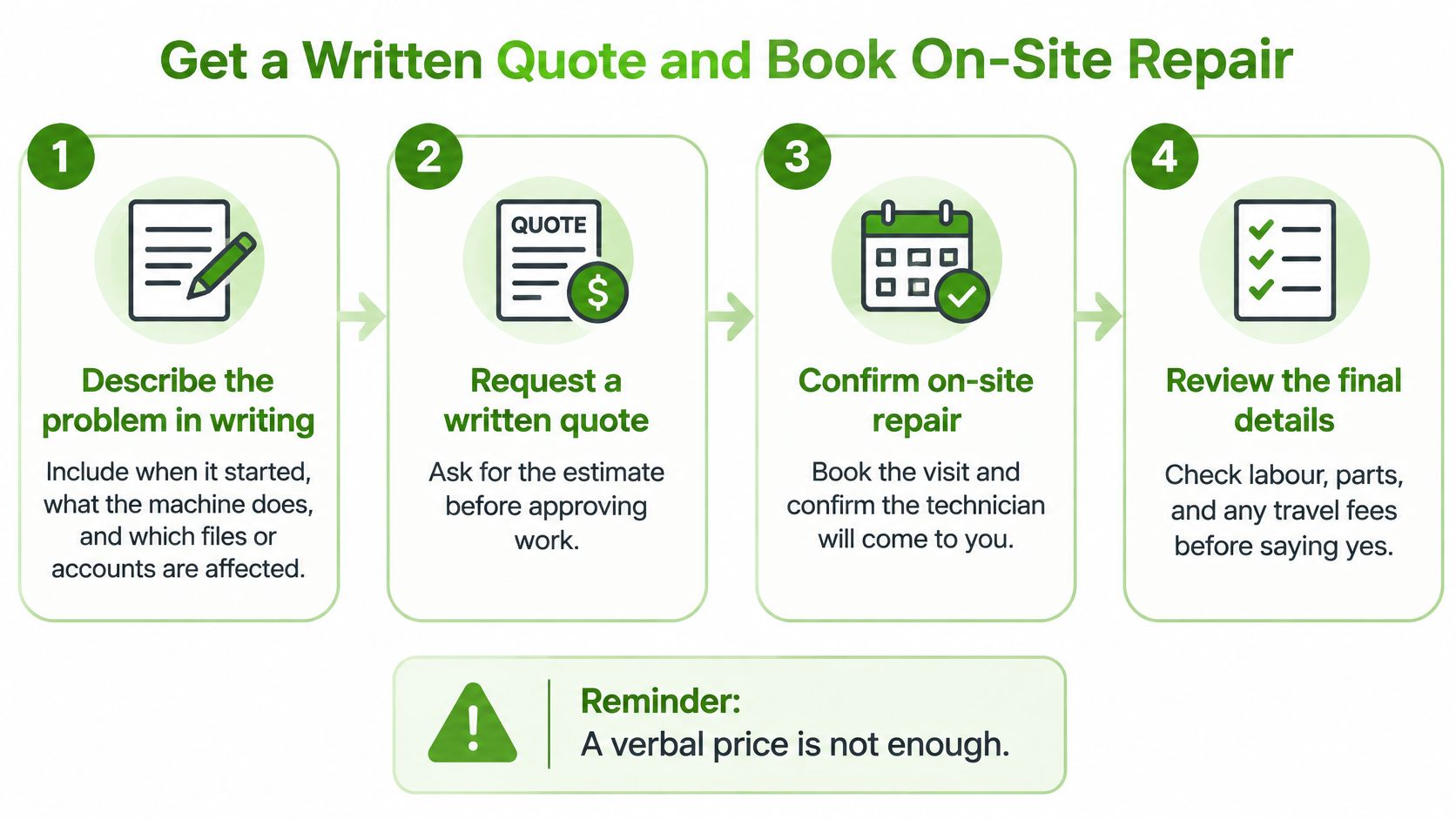
A verbal price is a starting point, not a decision. Get the scope and estimated cost in writing before work begins, especially when diagnosis may reveal a different fault from the one you suspected.
Describe the problem in writing. Say when it began, what the computer does and whether particular files or accounts matter. A clear description gives the technician a record of the issue you are authorising them to investigate. Include error messages if they appear.
Provide the exact model. The make and model can affect labour and parts options. For a replacement part such as a laptop screen, the model helps Nerds 2 You Edmonton check compatible repair options. Some laptop models require different labour pricing, so ask the business to confirm the rate for your device.
Request a written estimate with separate costs. Ask for diagnosis, labour, parts and GST to be shown clearly, and ask whether the diagnostic fee is credited toward approved work. At Nerds 2 You Edmonton, required parts are separate from labour, and advertised rates exclude GST.
Confirm what the estimate includes. Check whether it covers the full repair or only the confirmed fault. If the technician finds something new, make sure you know how approval for additional work will be handled.
Agree on how changes are approved. Alberta's Consumer Bill of Rights says a consumer shouldn't be charged more than 10% above an estimate, up to a maximum of $100, unless they agree to the increase. An estimate of $300 could ordinarily rise by $30; a $2,000 estimate is capped at a $100 increase. Ask how the technician will contact you if the scope or price changes.
Keep the repair order. Save the written estimate and repair order so you can check what you approved against the work proposed. Make sure the problem description is recorded accurately before the visit.
Nerds 2 You Edmonton provides on-site computer, laptop and desktop repair, laptop screen repair, Apple Mac repair, virus and malware removal, Wi-Fi and network support, and new computer setup with data transfer. Repair and setup work takes place at your home or workplace, so you don't need to bring the computer to a shop. When you request a quote, name the problem type, such as a slow desktop, a laptop hardware fault, a Mac needing screen work or a network that keeps dropping, and include the exact model where possible. Give the address and access details at booking, and ask whether the diagnostic fee is credited toward approved work.
If you're weighing a repair against replacement, Nerds 2 You Edmonton provides on-site computer diagnostics and repair for homes and workplaces, with labour and parts presented separately. Visit Nerds 2 You Edmonton to request a written quote for your device and decide with the full repair cost in front of you.
Discover more from Nerds 2 You
Subscribe to get the latest posts sent to your email.


One Comment
Comments are closed.