

Your computer always seems to pick the worst possible moment to act up. You sit down to join a work call, and the webcam won't connect. Your child's school project is due, and the laptop suddenly won't print. You open your desktop to pay bills, and instead of your usual browser, you get pop-ups, error messages, or a machine that crawls like it's moving through snow.
That's usually the moment people start searching for a personal computer specialist.
A lot of Edmontonians still picture that role the old way. Someone in a back room with a screwdriver, fixing broken towers and replacing hard drives. Modern support is much broader than that. A personal computer specialist is closer to a general practitioner for your technology. They diagnose what's really wrong, fix what can be fixed safely, and help prevent the same problem from coming back.
That matters because computers aren't niche tools anymore. They're part of daily life. In fact, 96.4% of households are projected to have at least one computer in 2026, according to IBISWorld's household computer ownership projection. In practical terms, that means almost everyone depends on a laptop or desktop at some point, and almost everyone eventually runs into a problem they can't solve with a restart.
If you're in Edmonton and trying to decide whether you need professional help, what kind of help to call, or whether on-site service makes more sense than hauling your machine across the city, this guide is for you. If you want a starting point for local help, computer service and repair in Edmonton is one example of the kind of on-site support model many home users now prefer.
Introduction The Moment You Realize You Need a Tech Expert
Individuals typically don't call a technician when the problem is small. They call when the problem starts affecting real life.
That could be a laptop that won't boot before a morning deadline. It could be a home office setup where the internet “works,” but video calls freeze and files won't sync. It could be a family computer that keeps getting slower, louder, and stranger every week until you finally think, “I'm done guessing.”
A personal computer specialist steps in when trial and error stops being useful. The job isn't just to repair a machine. It's to figure out whether your issue is really the computer, the software, the network, a device connected to it, or a combination of several small problems showing up as one big one.
Why people get stuck before they call
The confusing part is that computer problems rarely announce themselves clearly. A printer issue might really be a Wi-Fi problem. A “slow laptop” might be a storage problem, malware, or a cloud sync process fighting in the background. A machine that “just died” might still be fixable, but the longer you keep forcing restarts, the more risk you create.
People often wait because they think professional help will be inconvenient or expensive, or because they assume their problem is too minor to justify a visit. Then the issue spreads. A small boot error becomes data loss. A flaky connection becomes missed work. A neglected backup becomes a crisis.
A good technician doesn't just fix symptoms. They identify the layer where the problem starts.
What this guide is meant to help you do
If you're trying to make a calm decision instead of a panicked one, focus on these questions:
- What does a personal computer specialist handle? More than hardware. The role usually includes software repair, malware cleanup, setup help, and network troubleshooting.
- When should you stop trying DIY fixes? Usually when you've restarted, updated, and checked the obvious things, but the issue keeps returning.
- Why does on-site help matter? Because many problems only make sense in the environment where they happen.
In Edmonton, that last point matters more than people think. Home offices, mixed PC and Mac households, printers on wireless networks, and shared internet across many devices create issues that aren't easy to reproduce on a repair bench.
The Modern Tech Hero What a Personal Computer Specialist Actually Does
A personal computer specialist is a working problem-solver. The role sits between pure repair, practical consulting, and user support.
That's one reason this is a real profession, not a hobby category. The U.S. Bureau of Labor Statistics reports a median annual wage of $60,340 for computer support specialists in May 2024, which reflects the technical skill involved in the job and shows that support work is an established occupation across North America, as noted in the BLS occupational profile for computer support specialists.

The job is wider than repair
If your laptop won't charge, a specialist may test the charger, battery, charging port, and power board. If your desktop starts freezing, they may look at storage health, Windows event logs, startup load, memory behaviour, or a failed update. If your video calls keep dropping, they may inspect Wi-Fi coverage, router settings, interference, and whether the issue is local to your machine.
That breadth is what surprises people.
A hobbyist often jumps straight to a favourite theory. A real specialist narrows the issue first. Is it endpoint, operating system, application, or network? Is the safest first fix a driver rollback, a profile repair, malware cleanup, a hardware swap, or a settings correction?
A few real-world examples
Your MacBook turns on, but apps crash and storage is nearly full. A personal computer specialist doesn't just tell you to delete files. They check what's consuming space, whether sync folders are looping, whether the drive is healthy, and whether your backup is current before changing anything major.
Your Windows laptop works fine in one room but crawls in another. That doesn't always mean the computer is failing. A specialist may discover weak wireless coverage, poor router placement, or too many devices competing on the same network.
Your family desktop is “slow.” That word covers a lot. It might mean long startup times, delayed browser response, noisy storage, overheating, too many background apps, or malware.
Practical rule: The best technician is rarely the one who replaces the most parts. It's the one who identifies the simplest safe fix that addresses the real cause.
Home users and business users often need the same core skills
There's a useful overlap between residential support and small business support. The same technician who fixes a failing laptop can also help a small office with shared printers, workstation setup, network reliability, and ongoing device support. Businesses that outgrow one-off repair often start looking at broader planning and preventive help. If you're comparing models for that side of the decision, this overview of strategic IT support for businesses gives useful context on how structured support differs from emergency-only fixes.
For Edmonton households and small offices, the modern personal computer specialist is often the person who restores order when tech has become confusing. They translate symptoms into causes, causes into fixes, and fixes into plain English.
Beyond the Blue Screen Common Problems a PC Specialist Solves
Individuals don't call and say, “I have a failing storage device and a corrupted profile.” They say, “My computer is acting weird.”
That's normal. Symptoms are what you see. Diagnosis is what the specialist does.
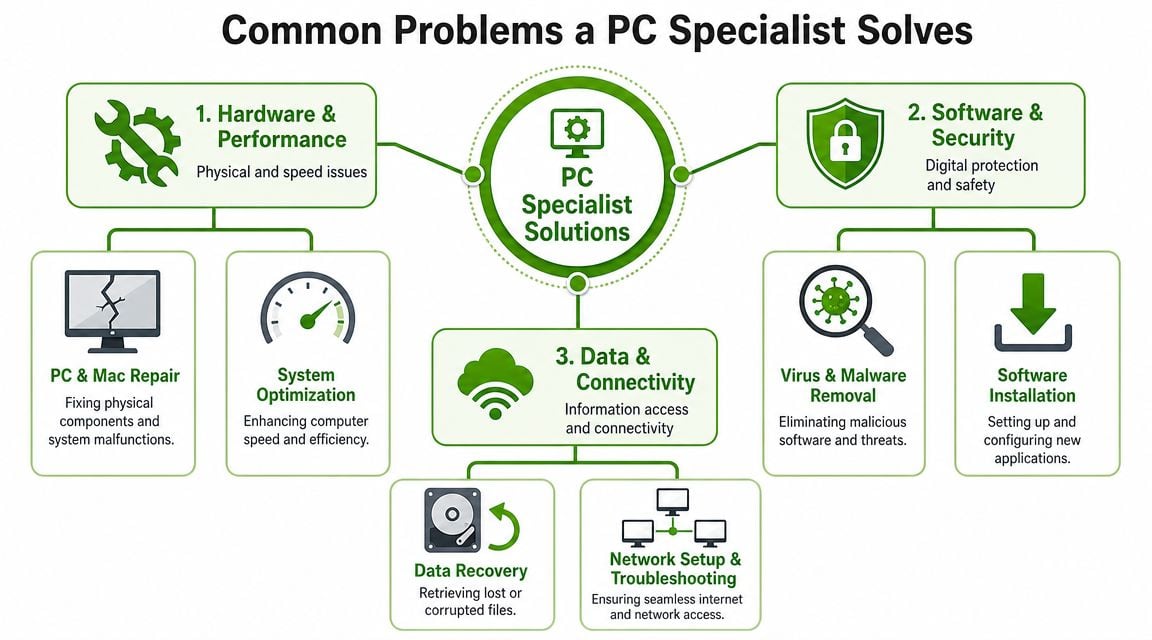
Slow systems and startup problems
A computer that takes forever to boot, hesitates when opening apps, or becomes unusable after login may have several possible causes. Common ones include overloaded startup programs, failing storage, low free space, damaged user profiles, update issues, or malware.
A good specialist won't treat all slowness the same way. They'll separate these questions:
- Does the machine feel slow all the time? That often points to hardware strain, storage issues, or background load.
- Is it only slow online? That may be a network issue, not a computer issue.
- Did the slowdown begin suddenly? That often suggests a recent software change, update, or infection.
One of the most useful things to know is that many “computer is slow” complaints turn out to be internet or Wi-Fi complaints. With 94% of Canadian households online, many user-reported slow computer issues stem from Wi-Fi coverage gaps, router misconfiguration, or too many connected devices, which is why network knowledge matters so much in practical support, as summarised in this O*NET-linked support role reference.
Malware, pop-ups, and browser hijacking
If your browser opens strange pages, your search engine changes on its own, or pop-ups keep appearing even when you're careful, there's a fair chance the issue is malicious software or a harmful browser extension.
This doesn't always look dramatic. Sometimes malware shows up as subtle instability. Your homepage changes. Fake alerts appear. The fan runs constantly. The machine becomes sluggish for no obvious reason. In those cases, proper cleanup matters more than random free scans.
If that's the kind of issue you're dealing with, it helps to understand the basics of how to remove a virus from a computer before trying too many quick-fix tools.
Files that vanish or won't open
A laptop that won't boot is stressful. A laptop that won't boot when your tax records, work documents, or family photos are trapped on it is a different level of stress.
A personal computer specialist may help in a few different ways here:
| Situation | What it may mean | What a specialist may do |
|---|---|---|
| Computer won't start, but drive may still be readable | Boot or hardware problem | Test access with external tools or alternate boot media |
| Files are missing or corrupted | User error, sync issue, file system damage, malware | Check recovery options and isolate the cause before writing new data |
| You have no current backup | Risk is higher if the machine worsens | Prioritise backup creation before deeper repair |
The mistake people make is continuing to use the machine normally after they realise something is wrong. If the drive is unstable, every write can complicate recovery.
If your files matter more than the computer, say that first when you call. It changes the repair order.
Network and device problems that look like computer problems
A printer showing “offline” doesn't always need printer repair. A laptop dropping from Teams calls may not need a new laptop. A smart TV, doorbell, gaming console, work notebook, and tablet all sharing one home network can create a situation where the weak point is the network layout, not the computer itself.
A capable specialist often handles:
- Wi-Fi dead zones in bedrooms, basements, or detached office spaces
- Guest network setup for visitors or smart-home devices
- Router and device conflicts when printers, laptops, and phones won't stay connected
- Mixed platform environments where Windows and Mac devices need to share access reliably
That's one of the clearest signs you're dealing with a real personal computer specialist rather than someone who only swaps parts. They understand that your tech doesn't live alone. It lives in a system.
Warning Signs Your Technology Needs Professional Help
Some problems are clear emergencies. A laptop won't turn on. A hard drive clicks. A screen goes black. Those are easy to recognise.
The harder situations are the slow-building ones. The machine still works, technically, so you keep putting off the call. That delay is where a lot of avoidable trouble starts.
The slow-down that keeps getting worse
If your computer has been gradually taking longer to start, struggling with basic programs, or freezing more often, don't assume that's just age. Computers do get older, but gradual decline usually has causes you can investigate.
It may be overloaded startup items. It may be storage wear. It may be background tasks, bad updates, or infections. What matters is the pattern. If performance keeps slipping, it's no longer a one-time glitch.
Pop-ups, redirects, and odd behaviour
A sluggish machine plus constant pop-ups is one of the clearest signs that you need help. AV-TEST reports over 450,000 new malicious programs daily, which gives you a sense of how unrealistic it is for the average user to keep up with threats using guesswork alone, according to AV-TEST malware statistics.
Watch for behaviour like this:
- Browser redirects: You search one thing and land somewhere else.
- Unexpected alerts: Security warnings appear even when you haven't installed security software.
- Apps launching on their own: Programs open or close without you doing anything.
- Settings changing back: Your homepage, default browser, or search engine won't stay where you set it.
These aren't the kind of symptoms you want to “wait and see” on.
Strange sounds, repeated errors, and failing connections
Hardware often gives warning before total failure. Clicking, grinding, or repeated failed boots can mean a component is struggling. Ignoring those signs can turn a repairable situation into a data-loss situation.
Connectivity warnings matter too. If restarting the router helps for an hour and then the same devices fail again, the problem likely needs proper diagnosis.
A quick way to think about it is this:
| Warning sign | Why it matters | Best next step |
|---|---|---|
| Clicking or grinding from a computer | Possible drive or fan failure | Stop using it heavily and get it checked |
| Same error keeps returning after restart | Issue isn't resolved at the root | Document the error and call for diagnosis |
| Wi-Fi drops in the same pattern every day | Could be signal, device load, or router configuration | Test the environment, not just the laptop |
| System crashes during updates or installs | May indicate deeper OS or hardware trouble | Avoid repeated forced restarts |
If you've tried the basic fixes and the same symptom keeps coming back, the issue usually isn't “random.”
The Convenience Factor On-Site Specialists vs Traditional Repair Shops
When people think about computer repair, they often picture unplugging everything, putting the tower or laptop in the car, driving to a shop, explaining the issue at a counter, then waiting for a call.
That model still has its place. But for many everyday problems, on-site service makes more sense because the problem often involves more than the device itself.
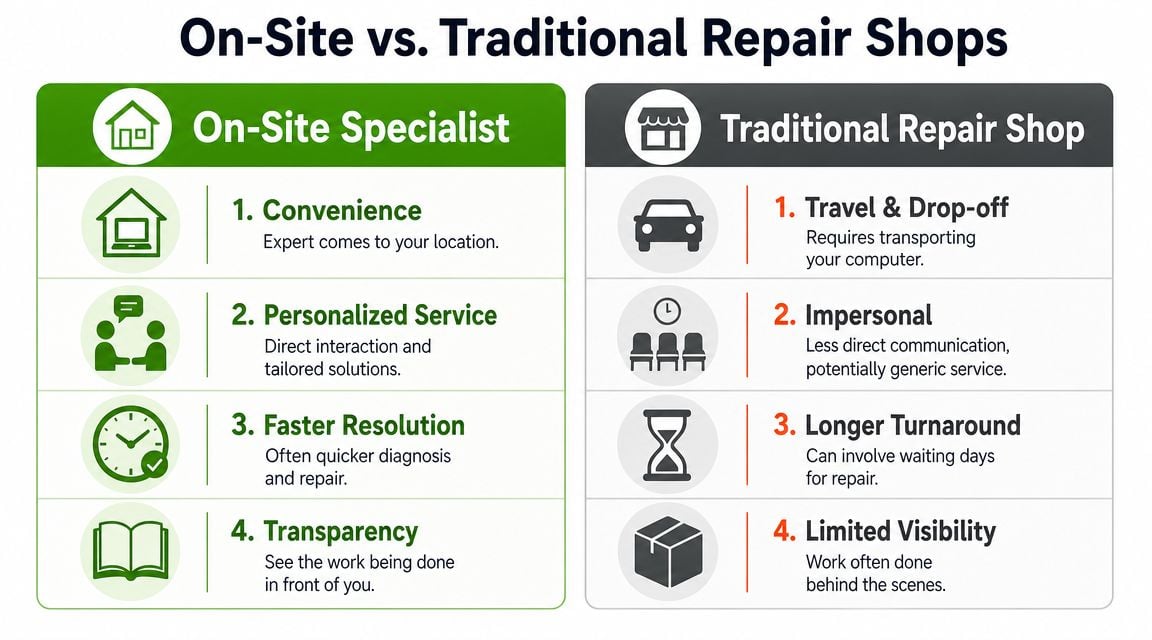
Why context matters
A bench technician can test your computer in a controlled environment. That's useful for certain repairs. But if your issue only happens on your home Wi-Fi, with your printer, in your office, using your monitor, your login, and your networked devices, clues are at your location.
That's especially true for:
- Intermittent wireless problems
- Printer and scanner issues
- New computer setup
- Data transfer from an old machine
- Home office and small business network problems
On-site support lets the specialist see the setup exactly as you use it. They can check cable paths, signal quality, device placement, and how your systems interact during actual use.
A simple way to decide
If you're unsure which service model fits your problem, use this quick framework.
| Ask yourself | If the answer is yes | Usually points to |
|---|---|---|
| Does the issue involve internet, Wi-Fi, printers, or multiple devices? | The environment matters | On-site service |
| Is the machine difficult to move or heavily connected to other gear? | Transport is a hassle | On-site service |
| Do you need help setting up backups or transferring data safely? | It helps to do it in place | On-site service |
| Is this a board-level or parts-intensive repair requiring shop equipment? | Bench work may be necessary | Traditional shop or arranged depot repair |
One practical advantage people overlook is backup setup. Backblaze's 2024 data loss survey says 1 in 4 people have lost data from their computer, and an on-site visit makes it easier to build a backup routine around the way you use your devices, as discussed in Backblaze's data loss statistics overview.
If you want a clearer sense of what that service model covers, this page on what on-site computer repair includes outlines the kinds of problems that are often solved more effectively in the home or office than at a counter.
Questions to ask before you book
The smartest way to compare providers is to ask practical questions, not marketing questions.
- Will the technician work on the issue in my actual setup? Important for networks, printers, and multi-device homes.
- Can they help with both repair and prevention? Especially useful if you need backup, cleanup, or system organisation.
- What happens if the issue turns out to involve several devices? That's common in home offices and small workplaces.
On-site service isn't always the answer. But when the problem lives in your environment, it's usually the fastest way to get a meaningful fix.
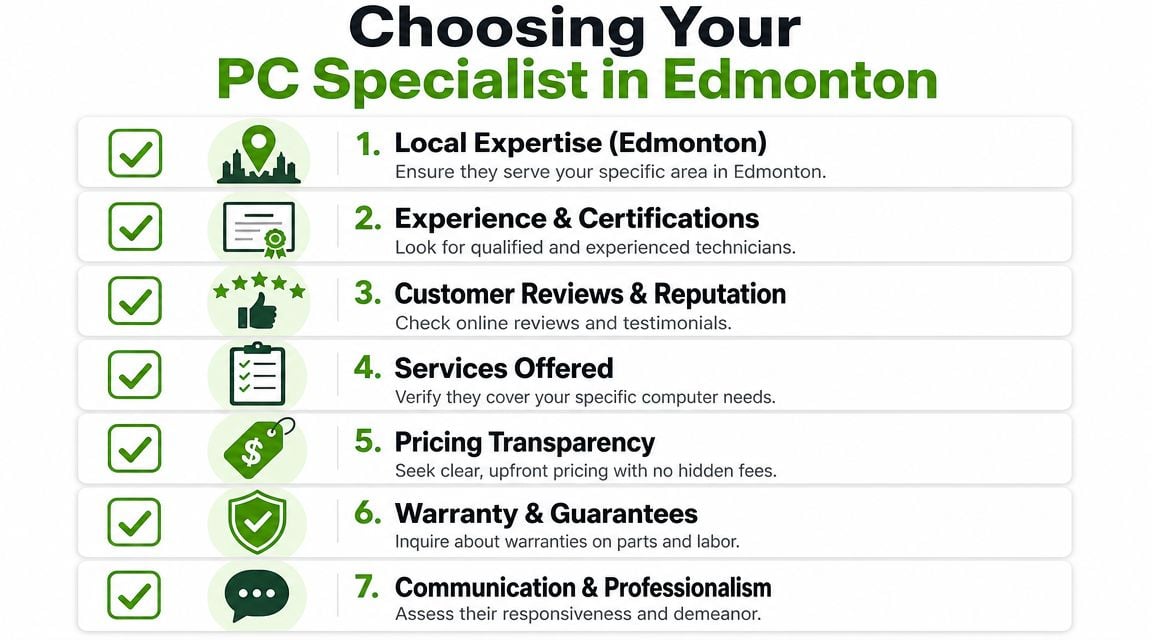
How to Choose the Right PC Specialist in Edmonton
Not every technician who can replace a part is the right fit for your situation. In Edmonton, the best choice often comes down to how well a provider matches your actual problem, your location, and the way you use your devices.
If you're hiring a personal computer specialist, think less about slogans and more about evidence.
Start with service fit
First, make sure they do the kind of work you need.
That sounds obvious, but it's where many people lose time. Some providers focus on shop-based hardware repair. Some focus on business contracts. Some only support Windows. Others do general support but not networking. If you need help with a MacBook, a home printer, and a flaky wireless connection, you want someone whose service scope matches that combination.
Look for specifics such as:
- PC and Mac support rather than one platform only
- On-site visits if your issue depends on the environment
- Home network troubleshooting instead of computer-only repair
- Small business support options if you run a local office and need ongoing help
Ask better questions on the first call
A short call can tell you a lot if you ask useful questions.
Try these:
- Do you handle both hardware and software issues?
- Can you troubleshoot Wi-Fi and printer problems on-site?
- What's your approach if my data is more important than the machine itself?
- Do you support small and medium businesses with ongoing help?
- Do you offer remote-only support, or do you come on-site?
Those questions do two things. They reveal the technician's range, and they reveal how clearly they communicate. If the answers are vague, rushed, or confusing, that usually shows up again during the service itself.
Look for professionalism you can verify
A strong provider should be able to explain process, privacy, and scope in plain language.
That includes:
| What to check | Why it matters |
|---|---|
| Clear service area in Edmonton | Confirms they actually cover your location |
| Transparent pricing structure | Helps you avoid surprises |
| Reviews that mention real scenarios | Better than generic praise |
| Ability to explain limits | Honest technicians say when something is outside scope |
| Privacy practices | Important if they'll handle personal or business files |
For example, Nerds 2 You Edmonton is a local on-site provider that does not offer remote services, and for businesses it provides ongoing support and network monitoring rather than full MSP coverage. That kind of clarity is helpful because it tells you what the company does, and what it doesn't do.
A trustworthy technician doesn't promise every possible fix. They define scope clearly before work begins.
Match the provider to your setting
Home users and small businesses should evaluate support a bit differently.
For home users, convenience, communication, and on-site problem-solving usually matter most. For a small business, consistency matters too. You may need someone who can support workstations, printers, shared connectivity, user issues, and ongoing monitoring without pretending to be a giant outsourced IT department.
That middle ground is often ideal for Edmonton companies that need practical support without a full managed services arrangement.
A simple Edmonton hiring checklist
Before you book, make sure you can answer yes to most of these:
- They serve your area locally
- They explain their pricing before the visit
- They support the platform you use
- They can work on-site if the problem involves your setup
- They speak clearly about backups, privacy, and data handling
- They can describe what happens if the issue turns out to be larger than expected
If a personal computer specialist can do that, you're much less likely to waste time, repeat the same repair twice, or end up with a fix that only works until the next reboot.
Conclusion Your Local Solution for Tech Peace of Mind
When your computer starts failing, the most frustrating part usually isn't the machine itself. It's the uncertainty. You don't know whether the problem is serious, whether your files are safe, or whether you're about to lose half a day dragging equipment somewhere for an answer that still doesn't solve the underlying issue.
That's where a personal computer specialist earns their value. They narrow the problem, explain it in plain language, and fix it in the place where you use your technology. For many Edmonton homes and small offices, that on-site approach is more practical. It avoids guesswork and reduces the chances of treating the wrong symptom.
If you're deciding what to do next, keep it simple:
- Stop forcing repeated restarts or random fixes if the issue keeps returning.
- Decide what matters most. Fast recovery, data protection, network reliability, or all three.
- Choose a local specialist who matches your real setup, not just a generic repair category.
If your problem involves a laptop, desktop, Wi-Fi, printer, data transfer, malware cleanup, or a small office environment, local on-site help can save a lot of time and stress. The goal isn't just to get your computer working again. It's to get your routine back.
Frequently Asked Questions About PC Support
How long does a typical on-site visit take
It depends on the problem. A simple software issue, printer setup, or email configuration may be handled in one visit. A deeper issue involving failing hardware, severe malware, or data risk can take longer because the technician needs to work carefully.
What matters more than the clock is whether the visit includes proper diagnosis. Fast isn't helpful if the root problem is missed.
Is it more expensive to have a technician come to my home
Not always in any meaningful sense. On-site service can save time and hassle when the issue involves your network, printer, multiple devices, or a full setup that would be awkward to disconnect and transport.
For many people, the better question is not “Is there a travel cost?” It's “Will this service solve the problem where it happens?” If yes, on-site support often makes practical sense.
Is my old computer worth repairing or should I replace it
That depends on what's failing and how you use the machine. If the issue is limited to storage, memory, software damage, or setup problems, repair may still be reasonable. If the machine no longer fits your work, struggles with current software, or has several failing parts, replacement may be the better path.
A good technician should be willing to say when repair isn't the smartest investment.
What should I do before the technician arrives
A little preparation helps:
- Write down the symptoms and when they started
- Note any error messages exactly as they appear
- Gather passwords if you'll need account access
- Back up important files if the computer still works and you can do so safely
- Clear a workspace near the computer, router, or printer if those devices are involved
If you're worried about data loss, say that right away when booking. That changes the safest order of work.
Can a personal computer specialist help a small business without acting as a full MSP
Yes. Some providers work in that middle space. They help with ongoing support, troubleshooting, workstation issues, and network monitoring for small and medium businesses without offering a full outsourced IT department model.
That can be a good fit if your business needs dependable support but not a large managed services contract.
If you need practical, on-site computer help in the Edmonton area, Nerds 2 You Edmonton provides mobile support for homes and offices, including PC and Mac repair, malware cleanup, network troubleshooting, new computer setup, and small business support with ongoing assistance and network monitoring.
Contact Nerds 2 You for quality professional service
Experience the difference with our dedicated team of experts ready to assist you. Whether you need immediate support or have questions about our services, we are here to help. Reach out today and let us provide you with the reliable service you deserve. Your satisfaction is our priority and we guarantee a prompt response to all inquiries.
Discover more from Nerds 2 You
Subscribe to get the latest posts sent to your email.