

Your laptop won't start before a work call. Your desktop is buried behind a desk with a nest of cables. Your Wi-Fi keeps dropping in the room where you need it. You don't mind getting help with a computer problem. You mind unplugging everything, hauling it across Edmonton, then waiting days to hear what the problem is.
That's where in home computer repair makes sense. A technician comes to you, sees the setup as it is, and fixes what can be fixed on site. For home users, that usually means less disruption. For families, it means someone can deal with the issue where the printer, router, smart TV, and laptop all interact. For small offices and home offices, it means the technician can spot problems that never show up on a repair bench.
Table of Contents
Why Choose In-Home Computer Repair in Edmonton
The usual breaking point is simple. The computer fails at the worst time, and the repair itself isn't the only problem. You also have to shut everything down, unplug monitors, trace the right power brick, and figure out whether you're transporting just the tower or the whole setup.
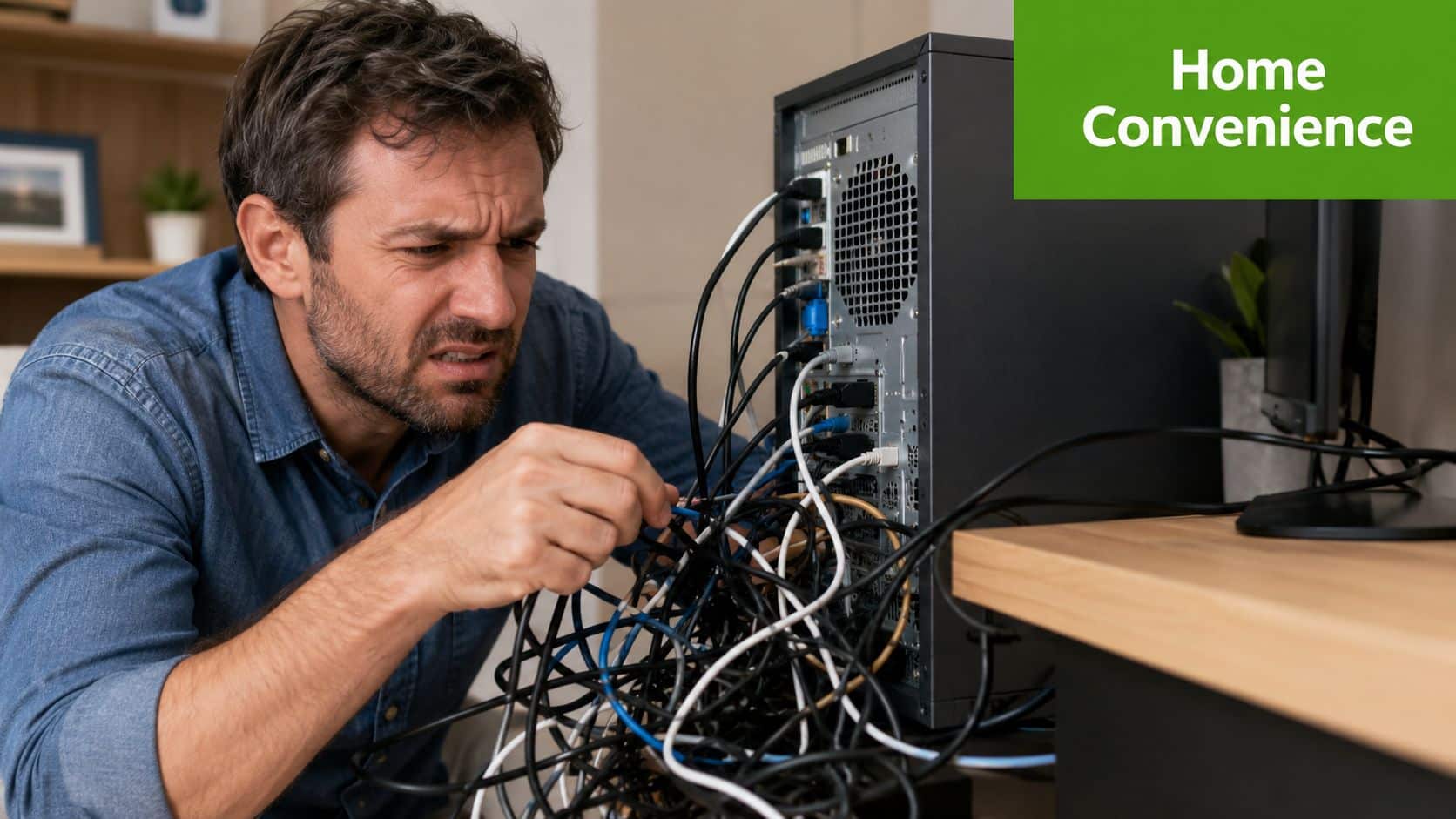
In Edmonton, that hassle matters more than people expect. A lot of computer trouble isn't isolated to one machine. A printer won't connect because the Wi-Fi is unstable. A desktop runs fine until it tries to reach a network drive. A new laptop is ready to use, but email, OneDrive, and the home printer still aren't set up properly. On-site service lets the technician see the full environment instead of guessing.
The main advantage is context
Bench repair is useful for some jobs. But home visits work better when the issue depends on your actual setup.
A technician can check where the computer sits, how it's connected, whether airflow is blocked, whether the modem and router are in the wrong spot, and whether multiple devices are competing for the same weak wireless signal. That kind of troubleshooting is hard to do accurately if the machine is sitting alone in a shop.
Practical rule: If the problem involves your network, printer, smart devices, multiple computers, or a desktop that's difficult to move, on-site service is usually the cleaner option.
Convenience isn't the only reason
People often assume mobile repair is just about saving a trip. It also reduces risk. Moving a desktop with loose cables, external drives, and older accessories increases the chance that something gets forgotten or damaged. Leaving the computer at home also means you can show the exact problem as it happens.
Edmonton still has active demand for this kind of work. Indeed listed 53 Computer Repair Technician jobs in Edmonton on its local board, which is a practical sign that businesses and households still need hands-on technical support in the city, including on-site diagnostics and repair work on Indeed Edmonton listings.
Common Services Offered by Mobile Technicians
A good mobile technician does more than fix a broken screen or remove a virus. Most home visits involve a mix of hardware, software, networking, and setup work. That's why on-site service is useful. The machine, the router, the printer, and the user are all in the same room.
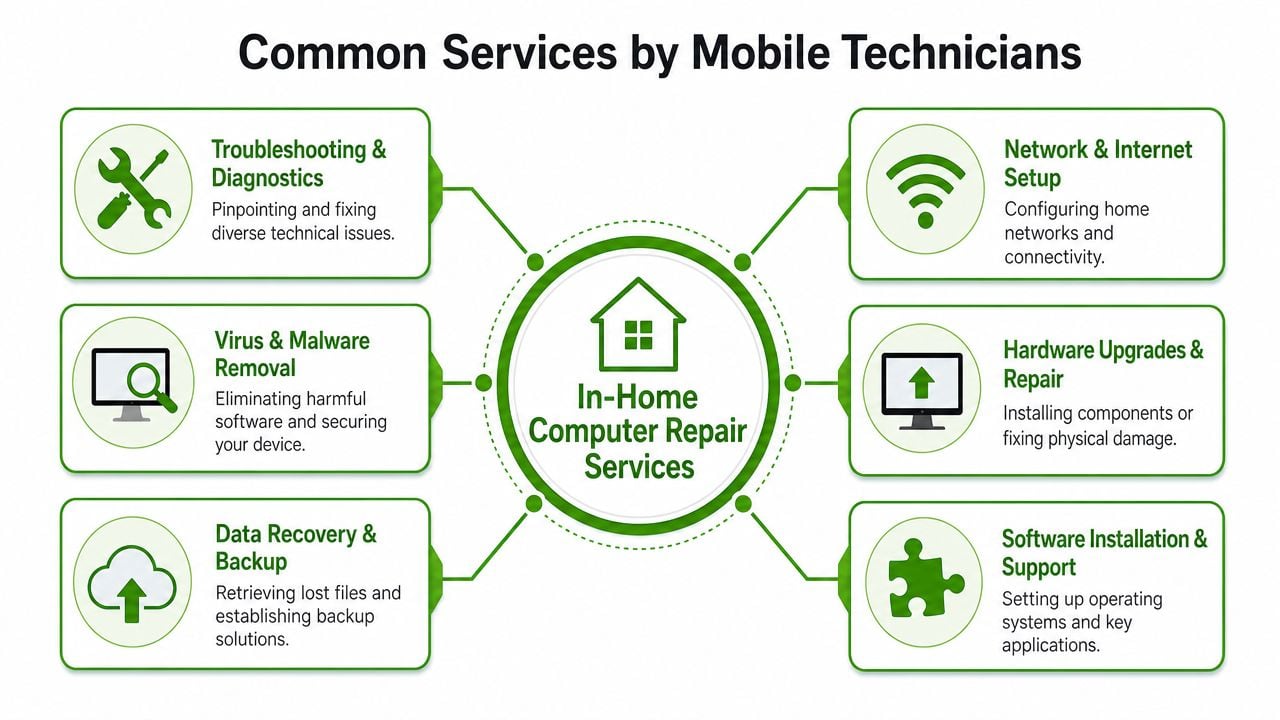
Virus and malware removal
This is one of the most common calls, and it isn't always obvious. Some computers are clearly infected. Pop-ups appear, the browser redirects, security warnings won't stop, or the device slows to a crawl. Other times the signs are subtle, such as unusual startup items, browser extensions you didn't install, or suspicious remote access software.
The need is real. Virus and malware incidents affect 4.2 million Canadian devices annually, according to a 2025 report referenced in the local service profile for Edmonton computer support through this Edmonton service listing.
A proper on-site cleanup usually includes:
-
Checking startup behaviour: Looking for unwanted apps, fake optimisers, and persistence tools.
-
Reviewing browser settings: Removing malicious extensions and restoring search and homepage settings.
-
Confirming security tools are working: Making sure the machine has active protection and isn't running conflicting software.
-
Explaining how the infection happened: So it doesn't come right back after the technician leaves.
Hardware diagnostics and repair
Not every failing computer needs a replacement. Many need a diagnosis first. A machine that won't power on could have a power issue, storage failure, RAM problem, overheating, or a damaged charging system. A technician on site can test the basics, isolate the fault, and tell you whether the repair is straightforward or whether parts need to be ordered.
This category often includes:
-
Laptop and desktop diagnostics
-
Drive upgrades
-
Memory upgrades
-
Power and charging issues
-
Screen-related Apple hardware work
If you're unsure whether a sluggish machine needs parts or just cleanup, that first diagnosis matters more than any sales pitch.
Network and internet troubleshooting
For certain issues, in-home service often beats drop-off repair. If your Wi-Fi is slow in the basement, a shop can't test that. If your printer disappears every second day, the issue may be your router settings, not the printer. If your video calls freeze only in one room, placement and interference matter.
Common on-site network jobs include:
-
Router placement review
-
Guest Wi-Fi setup
-
Printer connectivity fixes
-
Wired connection checks for home offices
-
Smart home device troubleshooting
One practical example: a computer may look fine on its own, but once the technician sees an overloaded wireless network with a weak signal reaching the office, the root cause becomes obvious.
Data backup, recovery guidance, and new setup
People usually ask about backups after something goes wrong. The smarter time is before. A home visit is a good time to review where files live, whether they're synced anywhere, and whether your external backup drive still works.
Mobile technicians also help with:
-
New computer setup
-
Email configuration
-
Transferring documents, photos, and user files
-
Basic recovery guidance when a drive is failing
-
Making sure cloud sync is set up correctly
If you're replacing an older machine, planning matters. A solid technician should talk through app compatibility, file transfer, and whether you should be upgrading operating systems on the existing device or moving to a newer computer instead.
The best service calls don't just remove the immediate problem. They leave the computer easier to maintain next month.
Mac and PC support under one visit
Many Edmonton homes now have a mix of Windows laptops, MacBooks, older desktops, iPads, printers, and smart devices. That mix is exactly why one on-site visit can solve several issues at once. If you want a plain-language breakdown of what a house call can include, this guide on what on-site computer repair includes gives a useful checklist.
One local example is Nerds 2 You Edmonton, which provides certified on-site technicians for PC and Mac support, along with home and small business visits, based on its company profile and service description on the BBB listing.
Pricing and Repair Times What to Expect
Two questions are typically asked first. How much will this cost, and how long will it take? Both depend on whether the problem is diagnostic, repairable on the spot, or waiting on parts.
Why in-home service costs more than shop repair
You're paying for travel, convenience, and live troubleshooting in the environment where the problem happens. In Edmonton, established in-home technicians command an average hourly rate of approximately $175, with the final amount varying by experience and the complexity of the issue based on this Edmonton discussion of house-call rates. The labor rate at Nerds 2 You starts at $95 / hour
That doesn't mean every visit becomes expensive. Some of the most common jobs are solved in one appointment because the technician can diagnose and fix them immediately. The value isn't just the labour time. It's also avoiding disconnecting a full setup, transporting it, and then repeating the troubleshooting once you bring it back home.
Typical labour expectations
Some companies charge by the hour. Others combine an initial service call with hourly billing or quote a flat amount for routine work. Ask which model applies before the appointment starts.
Here is a practical planning table for common jobs in Edmonton at Nerds 2 You
| Service | Estimated Time On-Site | Estimated Cost Range (Labour) |
|---|---|---|
| Virus and malware removal | 1 to 2 hours | Approximately $95 to $160 |
| Hardware diagnostic | 45 minutes | $70 for Windows - $80 for Apple |
| New computer setup and data transfer guidance | 1 to 3 hours | $190 flat rate |
| Wi-Fi and printer troubleshooting | 1 hour | $95 |
| Operating system troubleshooting or cleanup | 1 to 2 hours | Approximately $95 to $190 |
These are 2026 estimates built from Edmonton's approximate hourly market rate, not fixed quotes. Parts, extended recovery work, and follow-up visits can change the final total.
What speeds a job up, and what slows it down
Fast jobs usually have one clear symptom. Slow jobs involve missing passwords, multiple devices, failing storage, or software problems layered on top of each other.
What works: Write down the issue, keep chargers and login details ready, and show the technician when the problem started.
What doesn't work is saying the computer is "just acting weird" and hoping the details come back later. Good notes can save billable time.
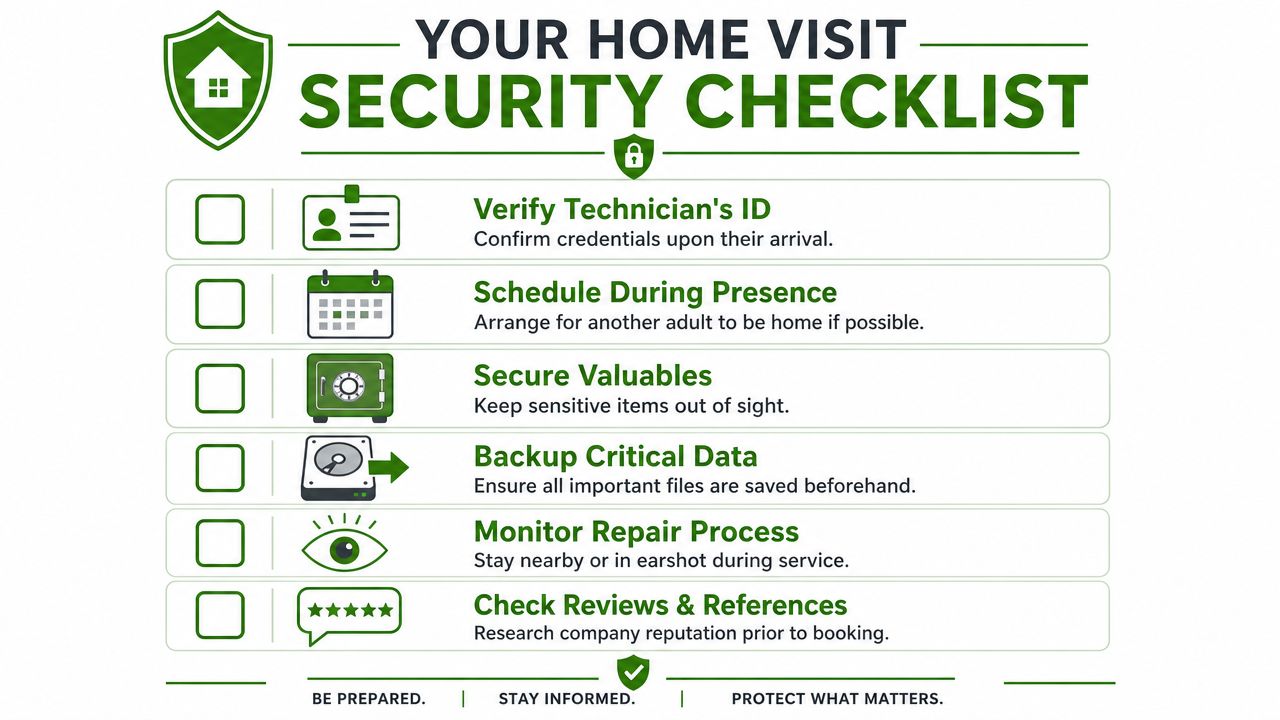
Staying Safe Your Guide to Home Visit Security
Letting someone into your home and handing them access to your computer shouldn't feel casual. Convenience matters, but safety and privacy come first. Many often focus on repair quality. Fewer think about identity checks, account access, and what personal files are visible during the appointment.
Before the visit
Start with legitimacy. Book with a real local company that has a visible service area, clear contact information, and a consistent online presence. Confirm the appointment details in writing if possible, including the service window and the name of the technician if the company provides it.
The scam risk isn't theoretical. Regional data from California found that 68% of seniors were targeted by tech support scams in 2025, and while that figure isn't Edmonton-specific, the lesson applies everywhere. Home visits should always begin with verification and caution.
Before the technician arrives:
-
Verify the business identity: Look for a local footprint, clear service descriptions, and recent reviews.
-
Back up anything critical: Even when the repair is routine.
-
Move sensitive documents out of sight: Paper records matter as much as digital ones.
-
Decide how passwords will be handled: You can enter them yourself when needed.
During the visit
Stay nearby. You don't need to hover over every click, but you should remain available and aware of what's happening. A trustworthy technician won't mind brief questions about the process.
Use these ground rules:
-
Don't hand over password lists: Type credentials yourself when possible.
-
Ask what software is being installed or removed: You should know what changes are being made.
-
Keep private folders closed unless they are part of the issue: There's no reason to expose more data than necessary.
If the technician pressures you to buy unrelated software, asks for unnecessary personal information, or wants unsupervised access beyond the repair scope, end the visit.
If a service provider gets annoyed because you asked basic security questions, that's your answer.
After the visit
Once the work is done, check that the original issue is resolved and that you understand any follow-up steps. If passwords were shared verbally, change them afterward. Review what was installed, what was removed, and whether any next steps remain.
If scam prevention is on your mind, this local article on avoiding a common computer scam is worth reading before you book a service call.
A Checklist for a Smooth Repair Visit
A little preparation can make a house call much more efficient. That helps the technician, but it also helps you. Less time spent chasing basics means more time spent solving the actual problem.
Gather the information that saves time
Write down what the computer is doing, not just what you think is wrong with it. The difference matters. "It shuts off after ten minutes" is more useful than "the motherboard is bad."
Use this prep list:
-
Note the exact symptoms: Include pop-ups, strange noises, error messages, and whether the issue happens every time.
-
Record when it started: After an update, after a spill, after a move, or after installing new software.
-
List affected devices: Sometimes the problem is one laptop. Sometimes it's every device on the network.
-
Keep login details available: You don't need to hand them over in advance, but you should be ready to enter them.
Set up the work area
The repair goes faster when the computer is accessible. Clear the desk, make room near power outlets, and make sure the area is well lit. If the issue involves internet, keep the modem and router accessible too.
A few practical steps help:
-
Connect the right accessories: Power cable, monitor, keyboard, mouse, printer, and any docking station involved in the issue.
-
Round up chargers and adapters: Laptop diagnostics often stall because the original charger isn't nearby.
-
Secure pets if needed: A calm workspace makes the visit smoother for everyone.
-
Back up what you can beforehand: Especially photos, financial files, and business documents.
Be ready to make decisions
Some repairs need approval during the appointment. You may have to decide whether to continue troubleshooting, order a part, replace a drive, or move to a new device instead.
Field advice: The fastest appointments happen when the client can answer three questions quickly: what changed, what's most urgent, and whether the data or the hardware matters more.
If you're arranging service for a parent or another family member, write these details down for them. That single step prevents a lot of confusion.
How to Find a Reliable Local Computer Tech
The Edmonton market has no shortage of people who can say they fix computers. The harder question is whether they show up professionally, explain things clearly, and respect your privacy in your home.

Signs you're dealing with a serious provider
Start with the basics. A reliable local tech business should have a proper website, a clear service area, and a straightforward explanation of what it does and doesn't do. Pricing doesn't need to be fully fixed for every situation, but the company should explain how billing works.
Look for these trust signals:
-
Local identity: Edmonton contact details, local service pages, and a Canadian web presence.
-
Consistent communication: Clear answers to questions about timing, fees, parts, and follow-up.
-
Defined scope: The provider should say whether they handle homes, businesses, Macs, PCs, networking, or only certain categories.
-
Visible reputation: Recent reviews and third-party business profiles help confirm you're not dealing with a fly-by-night operator.
If you want a general framework for screening service providers, HomeProBadge's contractor vetting guide is useful because the same logic applies here. Check identity, consistency, and proof of real local work.
Red flags that should make you pause
Some warning signs are obvious. Others are subtle.
Be cautious if a provider:
-
Gives vague pricing answers: "We'll see when we get there" shouldn't be the entire pricing policy.
-
Pushes replacement before diagnosis: Good technicians diagnose first.
-
Avoids written confirmation: Appointment details should be clear.
-
Pressures you into security software or subscriptions you didn't ask for: That's a classic trust breaker.
-
Can't explain the problem in plain English: If they understand it, they should be able to explain it.
A home visit requires more trust than a drop-off counter. That means professionalism matters more, not less.
A practical Edmonton benchmark
One useful local benchmark is experience plus verifiable business history. Nerds 2 You Edmonton has served the Edmonton area since 2009 and provides certified on-site technicians for PC and Mac models, supported by its business profile and BBB accreditation. That kind of record is a good sign because it shows the company didn't appear last week and disappear after a few complaints.
There are two scope points worth knowing upfront. Nerds 2 You does not provide remote services. Its model is on-site support. Also, Nerds 2 You doesn't provide full MSP services but does provide ongoing support and network monitoring for small and medium businesses. That's useful for SMB owners who need regular help but should be clear before anyone assumes a full outsourced IT contract.
If you're comparing Edmonton options for a house call, a search for PC help near me in Edmonton can help you evaluate what local providers offer on site versus what they only advertise broadly.
Frequently Asked Questions
Do I need to unplug everything before the technician arrives
Usually, no. In many cases it's better to leave the setup as it is so the technician can see the problem in context. Just make sure the area is accessible.
Who buys replacement parts
That depends on the provider and the repair. Some technicians source parts for you. Others recommend the part and install it after approval. Ask before work begins so there are no surprises.
What if the problem can't be fixed during the visit
That happens. Some issues need special-order parts, bench testing, or a replacement decision rather than a repair. A good technician should explain the next step clearly instead of leaving you guessing.
Can in home computer repair help small businesses too
Yes. It's often a strong fit for small offices, home offices, and mixed PC and Mac environments where network, printer, email, and workstation issues overlap. Some local providers also offer ongoing support for SMBs.
Is on-site service only for hardware problems
No. Many of the most useful house calls involve software cleanup, email setup, wireless troubleshooting, printer issues, account configuration, and new computer setup.
Are remote repairs available from every provider
No. Some companies focus strictly on home and office visits. If that matters to you, ask before booking. For example, some Edmonton providers operate only on site and don't offer remote sessions.
If you'd rather have a certified technician come to your home or office instead of hauling your setup across the city, Nerds 2 You Edmonton provides on-site PC and Mac repair, networking help, new computer setup, and small business support throughout Edmonton. Before you book anyone, ask about identification, pricing, timelines, and what happens if parts are needed. Those answers tell you a lot.
Contact Nerds 2 You for quality professional service
Experience the difference with our dedicated team of experts ready to assist you. Whether you need immediate support or have questions about our services, we are here to help. Reach out today and let us provide you with the reliable service you deserve. Your satisfaction is our priority and we guarantee a prompt response to all inquiries.
Discover more from Nerds 2 You
Subscribe to get the latest posts sent to your email.