

Your MacBook was fine a few months ago. Now it drops from a decent charge to a warning faster than it should, shuts down when you still need it, or only feels reliable when it's plugged into the wall. If that sounds familiar, your search for macbook battery replacement near me is probably less about curiosity and more about getting your day back.
That frustration is common in Edmonton. A MacBook battery isn't just a part in the background. It's the piece that lets you work from the kitchen table, study at a café, or move between meetings without dragging a charger everywhere. When it starts fading, the whole computer feels older than it is.
Your MacBook's Lifeline Is Fading Find a Solution Now
A tired battery changes how you use your laptop. You stop trusting it. You keep checking the battery icon. You choose the desk closest to an outlet instead of the one where you want to work.
In many cases, the battery really is the issue. In the Edmonton region, battery problems account for about 28% of all MacBook service requests between 2020 and 2025, based on the verified local repair data provided for this article. That fits what many local users experience. The MacBook still works, but portability starts slipping away first.
Why this shows up so often in Edmonton
Edmonton has a lot of people using MacBooks for work and school. The verified data shows over 120,000 home office users in the area from Statistics Canada 2023 labour data, and it connects rising battery demand to heavier everyday use after 2020. More use means more charge cycles. More charge cycles mean more wear.
Cold weather doesn't help either. Batteries don't like deep winter. When a laptop moves between a warm home, a cold vehicle, and a chilly office bag, the battery chemistry is under more stress than many people realise.
A failing MacBook battery rarely announces itself all at once. It usually starts with shorter runtime, then random shutdowns, then a computer you no longer trust away from the charger.
Why on-site help makes sense for this problem
Battery replacement is one of those repairs that sounds simple until you have to plan your day around it. You pack up the laptop, drive across the city, leave it behind, then arrange pickup later. That's inconvenient for anyone, but especially for remote workers, parents, and small business owners.
A mobile repair visit changes the experience. The technician comes to your home or office, confirms the battery issue, performs the replacement on-site if the model and part are ready, and checks that the MacBook charges and reports battery health properly before leaving. It's a practical fit for a repair that affects your daily routine so directly.
Is It Time for a New Battery Signs Your MacBook Needs Help
Some battery failures are obvious. Others are easy to mistake for a software glitch, a bad charger, or “just an older laptop.” Knowing the signs helps you decide whether you need a quick settings check or an actual replacement.

The common warning signs
Think of battery wear like mileage on a car. A car can still run with high kilometres, but some parts won't perform like they did when new. MacBook batteries work the same way. They age a bit each time you charge and discharge them.
Watch for these signs:
-
Short runtime: You charge fully, then lose power much faster than you used to during ordinary tasks like browsing, email, or video calls.
-
Unexpected shutdowns: The MacBook turns off before the battery meter says it should.
-
Service alerts in macOS: If you see messages such as “Service Recommended” or “Replace Soon,” your MacBook is telling you the battery health has dropped.
-
Slow charging or inconsistent charging: Sometimes the issue is the battery rather than the charger itself.
-
Trackpad or case changes: If the trackpad feels tight, click response changes, or the bottom case looks slightly raised, stop using it and get it checked.
What's happening inside the battery
Apple's System Management Controller monitors battery health by cycle count. For MacBook Pro M1 and M2 models, the battery is rated for 1000 cycles for 80% capacity retention, but Edmonton's climate can reduce effective cycles to 700 to 800 because cold-induced dendrite formation stresses the cells. Verified background data for this article also notes that capacity fade rate doubles below 0°C.
That technical language sounds intimidating, but the takeaway is simple. Cold weather can age your battery faster than you expect.
If you want to try a basic check before booking service, two simple steps may help:
-
Reset the SMC using Shift + Control + Option + Power for 10 seconds.
-
Calibrate the battery by doing a full discharge and recharge cycle.
For everyday habits that may help reduce wear, this guide on how to extend laptop battery life is a useful starting point.
Practical rule: If your MacBook only feels dependable when plugged in, treat that as a battery symptom even if the laptop still turns on.
When the problem becomes urgent
The most serious sign is swelling. A swollen battery can push upward inside the case, affect the trackpad, and place pressure on nearby components. If you notice the laptop rocking on a flat surface, a lid that doesn't close evenly, or a trackpad that suddenly feels stiff, don't keep charging it just to “get through the week.”
That's the point where a proper inspection matters. A worn battery is inconvenient. A swollen one can lead to bigger hardware problems.
Why On-Site MacBook Repair Is Your Best Choice in Edmonton
A shop repair and an on-site repair solve the same problem. The difference is what happens to your day while the repair is getting done.
In Edmonton, that difference matters more than many people expect. The city is spread out, the weather can turn ugly fast, and users searching macbook battery replacement near me aren't looking for a project. They want the laptop working again without losing half a day.
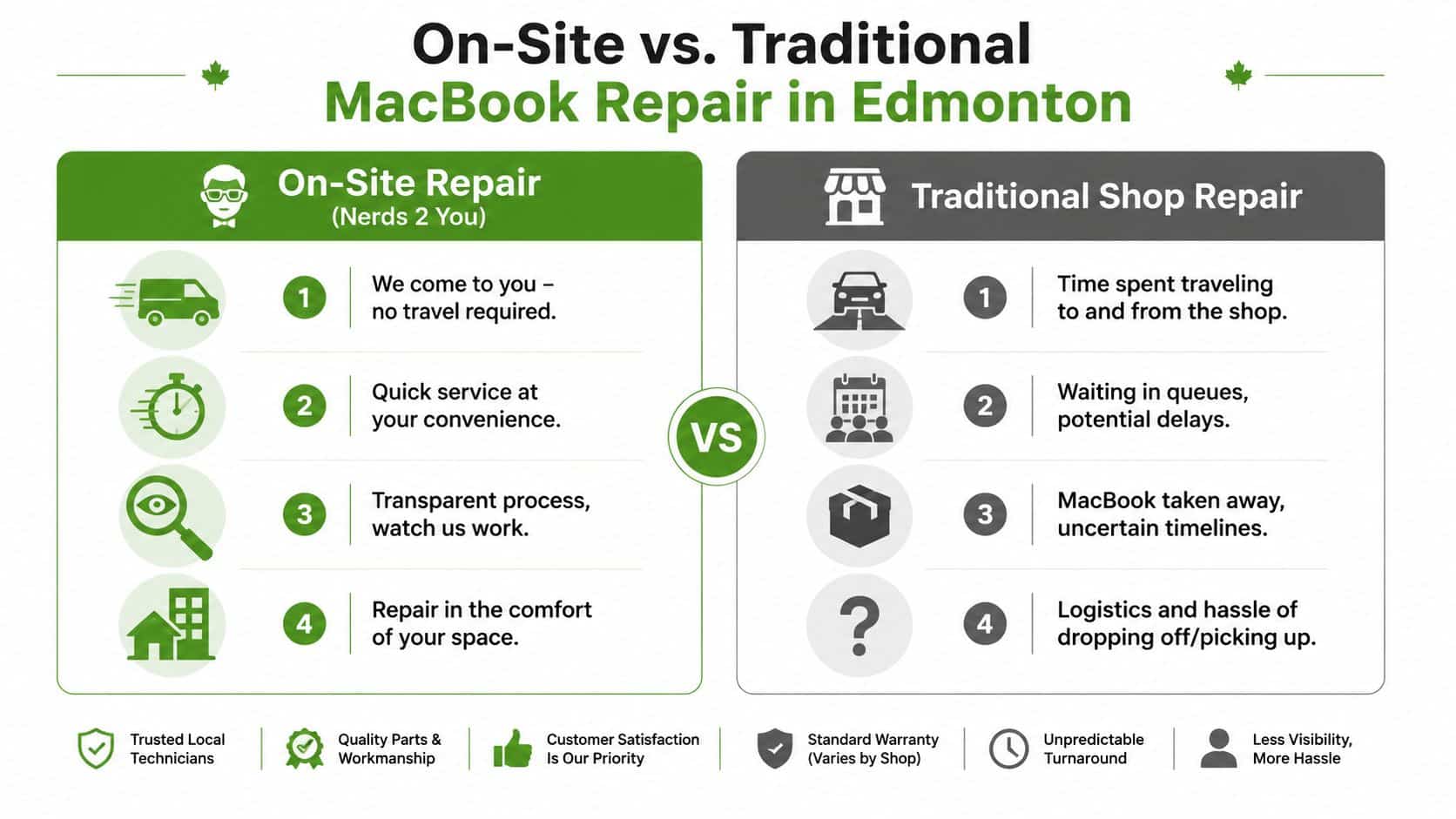
What on-site service changes
A verified 2025 Edmonton Chamber of Commerce survey found that 68% of Edmonton residents prefer mobile repairs to avoid downtime, while only 22% of listed providers offer certified on-site MacBook battery replacements. The same verified data says shop wait times average 3 to 5 days, while a mobile service can provide a same-day fix and reduce productivity loss by up to 40% for home offices.
Those numbers explain why mobile repair isn't just a nice extra. It answers a real local problem.
Here's what that looks like in practice:
-
You keep your routine: The technician works at your home or office, so you're not planning drop-off and pickup around traffic.
-
You can see the process: Many people feel better when the MacBook stays in front of them instead of disappearing into a back room.
-
You avoid weather and transport risk: In winter, carrying a compromised laptop through icy parking lots and cold car trips isn't ideal.
-
You cut downtime for work: If your laptop is your workday, every extra delay matters.
If you want a broader overview of what mobile service usually covers beyond batteries, what on-site computer repair includes gives a clear picture.
Why Edmonton makes mobile repair more practical
Traditional shop service made more sense when most computer use happened in one office and one commute. That's not how many households work now. People work from home some days, office days on others, and often depend on one main laptop for everything.
On-site service fits Edmonton because it reduces the friction that comes with distance. A battery replacement is a contained repair. It doesn't usually require you to surrender the computer for days just to solve a power problem.
When the repair can be diagnosed, completed, and tested where you already are, the mobile option often saves more than travel time. It preserves your workday.
The transparency factor
People often worry about letting someone open a MacBook. That's reasonable. MacBooks are compact, delicate machines, and battery work needs care. An on-site appointment gives you a better sense of what's happening. You can ask questions in real time, see whether the issue is truly the battery, and understand the result before the technician leaves.
That's useful for home users, and it's even more useful for small businesses that need practical support without handing over a stack of laptops to a storefront queue.
Our Hassle-Free MacBook Battery Replacement Process
When a MacBook battery starts acting up, the stressful part is usually the uncertainty. You are left wondering whether it is a worn battery, a charging problem, or something more serious. A clear on-site process takes that guesswork out of the repair and keeps the machine in a stable environment, which matters in Edmonton when crossing the city can mean extra time, extra handling, and extra exposure to cold.

Step One: Confirming the Actual Fault
Battery symptoms can be misleading. A MacBook that will not hold a charge may have a failing battery, but it can also have a charger issue, a damaged charging path, or software settings that make the problem look worse than it is.
That is why the first step is diagnosis, not parts swapping.
A technician usually checks:
-
Battery health information: What macOS reports about condition and cycle count
-
Charging behaviour: Whether the MacBook accepts and maintains charge properly
-
Physical warning signs: Swelling, case separation, or pressure under the trackpad
-
Related hardware issues: Other faults that can mimic battery failure
This step matters because replacing the battery only helps if the battery is the problem. It is a bit like changing a car battery when the alternator is at fault. You spend money, but the symptom stays.
Step Two: Using the Right Repair Method for Your Model
MacBooks may look similar from the outside, but inside they differ quite a bit. Battery shape, adhesive placement, connector access, and the order of disassembly can change from one model to the next.
That is where careful on-site work helps.
Instead of packing up the laptop, driving across Edmonton, and adding more movement to an already delicate device, the repair happens where the MacBook normally lives and works. That reduces unnecessary transport, which is especially useful if the battery is swollen or the case already feels tight.
The replacement itself involves opening the MacBook carefully, disconnecting power safely, removing the old battery without damaging nearby components, and preparing the interior for the new part. If a battery has expanded, the technician has to work even more cautiously around the trackpad, flex cables, and logic board.
Step Three: Installing the New Battery and Testing It Properly
Once the old battery is out, the new one is fitted, connected, and checked before the MacBook is fully closed up. This is the detail-oriented part of the job. Small connectors need to sit correctly. Internal cables need to rest in the right channels. Screws need to return to their proper locations.
After installation, the technician tests the MacBook to make sure:
-
it powers on normally
-
the system recognizes the battery
-
charging works as expected
-
battery reporting looks normal after calibration checks
Calibration can confuse people, because the battery may be physically installed but still need the system to relearn its behaviour. A simple way to think about it is this. The battery is the fuel tank, but macOS is the gauge on the dashboard. Both need to agree.
Step Four: Explaining What Happens After the Repair
A good visit ends with answers, not just a repaired laptop.
You should know what normal charging looks like over the next few days, whether any follow-up habits are recommended, and what signs would justify a recheck. That kind of handoff is one reason on-site service works well for Edmonton households and small businesses. You get the repair, the testing, and the explanation in one appointment, without losing half a day to traffic, parking, or a shop queue.
Nerds 2 You Edmonton provides this type of in-person MacBook battery service at homes and offices. For business clients, the same visit can also fit into a wider support setup, while still staying focused on the battery repair itself.
Understanding Costs and Timelines for Your Repair
A battery quote can feel confusing until you break it into two simple parts. What you are paying for, and how long your MacBook will be tied up.
For a useful baseline, Apple's Mac laptop repair pricing lists official out-of-warranty battery service in Canada at $149 to $199 CAD. Verified local pricing for Edmonton shows on-site replacements can start at $129 CAD. That difference matters, but the bigger point for many Edmonton customers is total time saved. A repair at your home or office can spare you a cross-city trip, winter driving, parking, and hours where your laptop is sitting somewhere else instead of staying near you.
That is part of why mobile service makes practical sense here. Edmonton is spread out, the weather is not always friendly, and a simple shop visit often takes more effort than the repair itself.
What the price usually covers
A battery replacement is a package of work, not just a part in a box. The bill usually includes:
-
The replacement battery
-
Labour for your specific MacBook model
-
Careful opening and reassembly
-
System checks after installation
-
On-site service at your location
The easiest way to picture it is a tire change done in your driveway instead of towing the car across town. You are still paying for the part and the technician's skill, but you also avoid the extra time, handling, and disruption that come with transporting the device.
Estimated MacBook Battery Replacement Costs Edmonton
| MacBook Model | Estimated Cost (CAD) |
|---|---|
| MacBook Air | Starting at $189 CAD |
| MacBook Pro 13" | Starting at $229 CAD |
| MacBook Pro 16" | Contact for model-specific estimate |
These are initial estimates, not fixed prices. MacBook batteries vary by model year, size, and internal design, so an accurate quote can be given after a quick model check. If you'd like a precise price before proceeding, feel free to contact us to confirm your model first.
How long it usually takes
There are really two timelines. One is how soon you can get an appointment. The other is how long the repair takes once the technician is in front of the machine.
Local service data for Edmonton notes that shop-based repairs often involve a wait of several days, while mobile service can often be arranged the same day depending on scheduling and parts. The repair itself is usually much shorter than the full interruption caused by dropping a laptop off at a store, leaving it there, and picking it up later.
That difference is easy to miss. Bench time is only one piece of downtime. Travel time, weather delays, and store queues count too.
For Edmonton households and small businesses, that is the main advantage of on-site work. Your MacBook stays with you, the risk of carrying it through snow or cold is reduced, and the repair fits into your day instead of taking over your day. If you run a local company, the same principle applies online too. Good service has to be easy to find and easy to use, which is why strategies that help local customers find your business matter in the first place.
Our Edmonton Service Area and How to Book Your Appointment
When a battery is failing, booking should be simple. You shouldn't have to guess whether your area is covered, whether the service is in-shop only, or whether you're going to spend more time arranging the repair than getting it done.
For Edmonton households and businesses, on-site service is built on the understanding that getting across the city takes time. Verified local data for this article notes that Edmonton's average commute time is 27 minutes, and that on-site service is designed to reduce that hassle. The same verified data says the service model has been operating since 2009, with over 3,200 on-site battery services completed and a 92% customer satisfaction rate.

A simple way to check service availability
If you're in Edmonton or the surrounding capital region, the easiest next step is to contact the provider directly and confirm your location and MacBook model. Have the model name ready if you can. That helps speed up parts and appointment planning.
Booking is simple through our online form on the contact page. If you would rather discuss your needs with someone directly, calling 587-772-NERD is usually the quickest method to check availability and describe the battery issues you're experiencing.
Why local visibility matters for repair searches
Many people start with a search, compare a few options, then choose the business that looks local, clear, and easy to contact. If you're curious how companies improve that visibility so nearby residents can find them, this guide on help local customers find your business explains the basics in plain language.
That matters because a search like macbook battery replacement near me only helps if the results clearly show who serves your neighbourhood and how booking works.
Frequently Asked Questions About MacBook Batteries
A lot of Edmonton customers ask the same practical questions before booking a battery replacement, especially if they are trying to decide whether on-site service is just easier or the smarter option. In many cases, it is both. When roads are icy, parking is tight, or your workday is already full, having a technician come to you can remove a surprising amount of hassle and risk.
Will replacing the battery erase my data
Usually, no.
A battery replacement deals with the power system inside the MacBook, not your documents, photos, or email. Even so, a current backup is still the safe habit. Any time a computer is opened for hardware work, it is wise to have your important files copied to iCloud, an external drive, or another backup you trust.
Should I keep using my MacBook if the battery is swollen
No. Stop using it and stop charging it.
If the bottom case looks pushed out, the trackpad feels tight or hard to click, or the keyboard area seems slightly lifted, the battery may be swelling and pressing against nearby parts. A swollen battery works a bit like a pillow expanding inside a closed box. Something else inside has to take that pressure. On-site service helps here because you do not have to keep carrying or driving with a machine that may already be under strain.
Can a bad battery make my MacBook feel slow
Yes, sometimes.
A failing battery can cause unstable power delivery, sudden shutdowns, heat, or reduced performance while macOS tries to protect the system. Slow performance can also come from low storage, aging memory, or software problems, which is why a proper diagnosis matters before replacing parts. The goal is to fix the cause, not just the symptom you happen to notice first.
Is it worth replacing the battery on an older MacBook
Often, yes, if the MacBook still does what you need it to do.
Many older MacBooks still have plenty of life left for email, web work, bookkeeping, school tasks, and office apps. In those cases, a new battery can restore the one thing that makes a laptop a laptop: reliable portable use. If everything else still feels good, battery replacement is often more sensible than replacing the whole computer.
Can I replace the battery myself
Some people try, but MacBooks are packed tightly and the battery is not a simple drop-in part on many models.
Connectors are delicate. Adhesive can be stubborn. Nearby components do not leave much room for slips or tool mistakes. If the battery is swollen, the risk goes up further. That is one reason many Edmonton owners choose on-site help. You get the convenience of staying put, plus someone who already knows the model-specific steps and warning signs.
How do I know whether I need a battery or a charger
Start with a few simple checks. Try a charger and cable that are known to work, if you have access to them. Then check battery health information in macOS and pay attention to what the MacBook is doing day to day.
If it only works on the charger, shuts off at random battery percentages, charges on and off, or shows a service warning, the battery becomes a stronger suspect. If it does nothing at all, the charger, charging port, or logic board could also be involved. When encountering these problems, on-site diagnosis saves time. You get answers where the MacBook is used, with your charger, your outlet setup, and your routine.
What kind of parts are used
Part quality matters because the battery affects runtime, charging behavior, and safety.
Ask whether the replacement battery is matched to your exact MacBook model and whether testing is done after installation. Good service is not just swapping a part. It includes confirming proper fit, stable charging, and normal battery reporting afterward.
How long should a replacement appointment take
It depends on your MacBook model and the condition of the battery.
Some appointments are straightforward. Others take longer because the battery is heavily adhered, the unit shows signs of swelling, or another power issue turns up during testing. For many people, the biggest time savings come from avoiding the trip across Edmonton, the handoff at a shop, and the second trip to pick the MacBook back up. In winter, that advantage becomes even more obvious.
Do businesses handle this differently from home users
The repair itself is similar, but the scheduling is often different.
A home user may want the MacBook fixed at the kitchen table or home office with as little disruption as possible. A business may need one laptop handled during office hours or several devices serviced in sequence so staff can keep working. On-site service is useful in both cases because the computer stays close to the person who relies on it.
If your MacBook will not hold a charge and you want a mobile repair option in Edmonton, Nerds 2 You Edmonton provides on-site computer and Mac service for homes and offices, so you can have the battery issue checked without adding a shop visit to your day.
Contact Nerds 2 You for quality professional service
Experience the difference with our dedicated team of experts ready to assist you. Whether you need immediate support or have questions about our services, we are here to help. Reach out today and let us provide you with the reliable service you deserve. Your satisfaction is our priority and we guarantee a prompt response to all inquiries.
Discover more from Nerds 2 You
Subscribe to get the latest posts sent to your email.