
You're halfway through a workday in Edmonton when your laptop suddenly refuses to cooperate. Maybe it won't turn on, the screen is cracked after a short drop, or every click takes so long that a simple email feels like a test of patience. Your first thought is often, “I should just buy a new one.”
That reaction makes sense, especially when work, school, banking, family photos, or business files are sitting on the machine. But the better question isn't just is it worth getting a laptop repaired. It's whether repairing this particular fault protects your money, your data, and your ability to keep working.
A calm decision usually comes down to a few checks. Compare the repair quote with the price of a comparable replacement, consider the laptop's age and performance, identify whether one component failed or several, and account for the cost of downtime and setup. Canada has a substantial electronic and computer repair sector, estimated at about $1.8 billion in market size in 2026, with roughly 2,607 businesses operating in the sector, according to Canadian electronic and computer repair industry data. Repair is an established option, not an unusual workaround.
This guide walks through the decision in plain language, with practical examples for Edmonton home users, remote workers, and small businesses. If you're also looking for broader ideas about technology and support tools, you can Browse SupportGPT's AI blog while you wait for a diagnosis. The immediate goal, though, is simple: help you decide whether to request a quote, recover your files, or start shopping.
Table of Contents
- Introduction When Your Laptop Suddenly Stops Working
- Understanding the Real Cost of Repair Versus Replacement
- Common Laptop Repairs and What They Really Cost
- How Age Performance and Warranty Change Your Decision
- Data Recovery Environmental Impact and What Happens If You Do Not Repair
- Why On-Site Diagnosis Makes the Repair Decision Easier in Edmonton
- Final Checklist to Decide Repair or Replace With Confidence
Introduction When Your Laptop Suddenly Stops Working
The hardest part of a laptop failure is often the timing. You may have a presentation due, a client waiting for a document, or a child who needs the computer for school. A dead battery or broken charging port can look like a complete computer failure, while a cracked screen can make a perfectly healthy laptop appear useless.
Start by separating the visible symptom from the likely fault. A laptop that powers on but shows no image may need a screen or display connection. A machine that works only when plugged in may have a worn battery. A computer that starts slowly but runs reliably may need storage or software attention rather than replacement. You don't need to identify the failed component perfectly before calling a technician, but you do need to avoid making an expensive decision based on panic.
The first decision is not “repair or replace.” It's “what actually failed?”
Repair becomes more attractive when the fault is limited to one replaceable part. It becomes harder to justify when the laptop has several problems at once, feels slow even when healthy, or has suffered serious liquid or motherboard damage. That's why a proper diagnosis matters more than a quick guess based on the laptop's age or brand.
Downtime belongs in the calculation too. A replacement involves choosing a model, moving files, reinstalling applications, signing back into accounts, reconnecting printers, and rebuilding your familiar setup. For a home office or small business, that work can cost more than the repair itself in lost focus and interrupted service.
You can make the decision quickly without rushing it. Get the fault identified, request a written estimate, compare it with a similar new machine, and ask what condition the laptop will be in after the repair. The answer should leave you with a usable plan, not just a part price.
Understanding the Real Cost of Repair Versus Replacement
Think about a car with a worn alternator. You wouldn't compare the alternator bill with the price of the cheapest car on a dealer's lot. You'd compare it with a similar replacement vehicle, then consider insurance, financing, setup, and the inconvenience of giving up a car you already know. A laptop deserves the same kind of comparison.
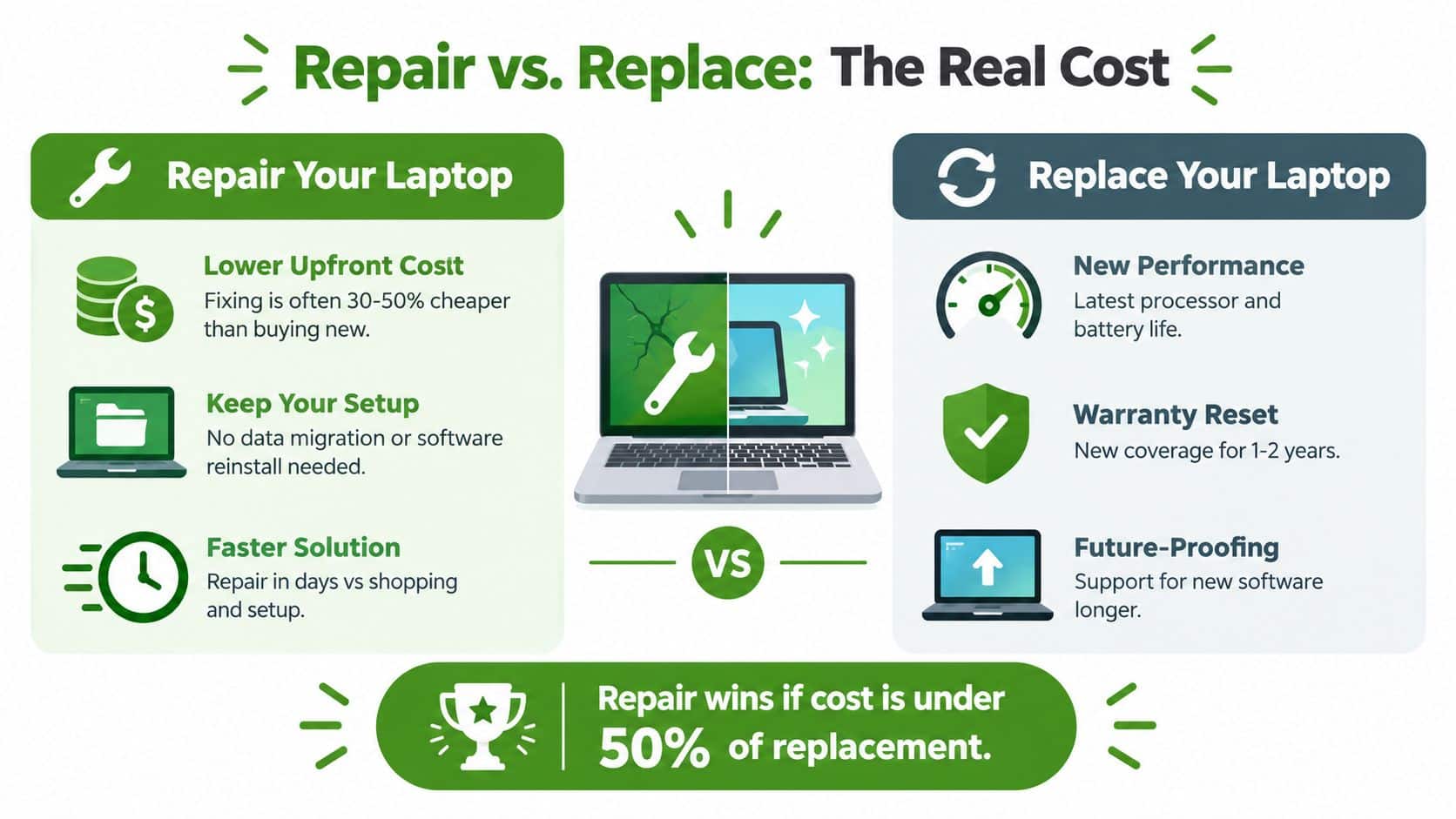
A practical Canadian guideline is the 50% rule. If the repair costs less than roughly half the price of a comparable new laptop, repair is usually the rational choice. One Canadian repair guide places typical replacement cost around CA$2,125 and many laptop repairs in the CA$50 to CA$700 range, as described in this Canadian laptop repair versus replacement guide. Those figures are a reference point, not a promise for your model or fault.
Apply the rule to a comparable machine
Use a like-for-like replacement. A basic laptop isn't a fair comparison for a business-class Lenovo ThinkPad, a MacBook used for professional applications, or a computer with a high-resolution touchscreen. Compare processor class, memory, storage, display quality, operating system, and build quality.
Then add the costs that don't appear on the shelf label:
- Setup time: A new computer needs accounts, updates, printers, browsers, applications, and preferences configured.
- Data transfer: Photos, documents, email archives, and business files need to move safely.
- Software access: Some applications require licences, subscriptions, or reconfiguration.
- Downtime: A replacement can interrupt work while you shop, configure, and learn the new system.
- Familiarity: Your existing keyboard, files, shortcuts, and workflow already work for you.
A repair quote gives you a more useful answer than a rough online estimate. Ask whether the price includes parts, labour, diagnosis, data handling, and any warranty on the completed work. Also ask what the technician found, not just what they plan to replace.
Know when replacement wins
Replacement makes more sense when the quote approaches half the price of an equivalent new machine and the laptop has other warning signs. Those signs include several failing components, poor battery life combined with slow performance, obsolete software support, physical damage around the hinges, or storage that is already showing errors.
Repair the part that failed, but don't pay to preserve a computer that has already become a daily obstacle.
For a home user, the cheapest choice may be a repair that keeps the current setup intact. For a small business, the right choice may be the option that restores reliable work with the least disruption. The 50% rule provides the anchor, but downtime and continuity determine where the final answer lands.
Common Laptop Repairs and What They Really Cost
Most laptop problems people bring to a technician fall into familiar categories. Screens crack, batteries weaken, storage devices fail, keyboards stop registering keys, and charging ports become unreliable. Each fault has a different repair path, so a single “average laptop repair cost” can mislead you.
Canadian repair coverage identifies batteries, screens, charging ports, and overheating among common reasons devices are discarded or replaced. Canada-oriented pricing guidance places many everyday laptop jobs at roughly C$35 to C$260, while data recovery and board-level work can cost more, as outlined by Global News coverage of right-to-repair issues. Your exact model, part availability, and damage determine the quote.
| Repair Type | Typical Approach | When Repair Is Worth It |
|---|---|---|
| Cracked screen | Replace the display panel or screen assembly after checking hinges and cables | Usually sensible when the laptop still performs well and the panel isn't unusually expensive |
| Weak or dead battery | Test battery health, confirm the charger and charging circuit, then replace the battery if appropriate | Often worthwhile when the laptop otherwise meets your needs |
| Failing hard drive or SSD | Diagnose storage health, protect the files, replace the drive, and reinstall or restore the system | Strong candidate when the laptop has good performance and the data is backed up |
| Broken keyboard | Test the keyboard, connector, palm rest, and signs of liquid damage, then replace the affected assembly | Usually worthwhile for a reliable machine, especially when the keyboard is the only failure |
| Charging port | Test the charger, port, battery, and power circuit before replacing or repairing the connector | Worth considering when the laptop is otherwise useful and the fault is localised |
| Overheating | Clean the cooling path, inspect the fan, and address thermal problems after ruling out deeper faults | Makes sense when slowdowns and shutdowns come from cooling rather than an aging platform |
Hardware replacement is different from board repair
A technician can often handle a screen, battery, keyboard, fan, storage drive, or charging assembly without replacing the entire computer. Board-level repair is a separate category because it involves model-specific circuit diagnosis, component availability, and specialised soldering work.
Nerds 2 You handles most major hardware repairs on site but does not provide board-level repairs. If a diagnosis points to a failed motherboard component rather than a replaceable part, you'll need to compare a specialist quote with the cost of replacement.
Canadian board-level pricing illustrates why diagnosis matters. One Canadian repair service lists motherboard component repair from $179 plus GST and DC jack or USB-C power port soldering at $129 plus GST, with pricing dependent on the fault and model, according to Canadian motherboard repair pricing. Another Canadian repair business describes replacement motherboards at $300 to $800 or more, while board-level repairs typically run $89 to $199, as shown in its board-level laptop repair comparison.
A single screen or battery problem is easy to evaluate. A laptop with a charging issue, liquid damage, failed storage, and a broken hinge needs a full quote before you commit.
How Age Performance and Warranty Change Your Decision
Age matters, but it isn't a verdict. A well-maintained laptop with a solid-state drive and enough memory can remain useful after a repair, while an older machine with slow storage may feel frustrating even after you replace the failed part.
Use the laptop's condition as a timeline rather than an expiry date. A three-year-old computer with an SSD and 16GB of RAM is generally a stronger repair candidate than a seven-year-old computer with a spinning hard drive. Those examples describe performance logic, not a universal rule. The processor generation, operating system support, battery condition, and upgrade options still matter.
Check what the laptop will feel like afterward
Ask yourself how the machine performs when the fault isn't happening:
- Speed: Does it open the browser, documents, and applications at a reasonable pace?
- Storage: Does it use an SSD, or does an older hard drive keep the whole system waiting?
- Memory: Does it have enough RAM for your normal workload, including video calls and browser tabs?
- Battery: Was the battery already unreliable before the current failure?
- Upgrade potential: Can a technician replace or expand the storage or memory?
Let warranty coverage change the maths
Check the original warranty, retailer protection, credit card coverage, and any extended plan before paying for service. A covered screen, battery, or hardware failure may be handled through the manufacturer or seller, although accidental damage often has different terms.
If the laptop is out of warranty, request a diagnostic quote before authorising work. A good quote should identify the failed part, explain the repair outcome, and make clear whether the technician found additional risk. You can then compare the cost with a similar replacement instead of reacting to a broad recommendation to “buy new.”
For a more realistic lifespan assessment, review this guide on how long a laptop computer should last. The important question isn't only how old the laptop is. It's whether the proposed repair will return a computer that remains comfortable and dependable for your actual workload.
A repair can be financially sensible and still be a poor choice if the laptop will remain too slow for your work.
Data Recovery Environmental Impact and What Happens If You Do Not Repair
A laptop can be damaged while its storage remains completely usable. A cracked display doesn't automatically erase documents, photos, tax records, or business files. A machine that won't boot may still contain recoverable data, so protecting the drive should come before wiping, recycling, or repeatedly trying risky fixes.
If the laptop still responds, back up important files before repair. If it won't start, tell the technician that the data matters and ask for a data-first assessment. You may decide not to repair the computer itself, but recovering the files can still make the situation manageable. Guidance about local options is available through Nerds 2 You data recovery near Edmonton.

Repair affects more than your budget
Statistics Canada reports that 52% of Alberta households had e-waste to dispose of, compared with 46% nationally, according to the Statistics Canada e-waste table. The same survey found that, among Alberta households with dead or unwanted computers, 72% sent them to a depot or drop-off centre, 30% put them in the garbage, and 9% repaired or sold them.
Those figures show two things at once. Alberta has a strong disposal and diversion network, but many unwanted computers leave households without a repair attempt. The province has more than 100 end-of-life electronics collection points, including 3 in Edmonton, so responsible recycling is available when a machine has reached the end of its useful life.
Repair-first thinking doesn't mean keeping every broken laptop forever. It means checking whether the fault is limited and whether the computer still has useful life. Extending the life of a working laptop avoids the need to manufacture and configure a replacement immediately, while responsible recycling remains the right outcome for a machine with catastrophic damage or no practical repair value.
Protect the files before testing repeatedly
If the computer makes unusual sounds, suffered a drop or liquid spill, or shows signs of storage failure, stop repeated startup attempts. A technician can assess whether the drive should be copied, removed, or handled through a recovery process. Your files may be more valuable than the laptop, so include that value in the repair decision from the beginning.
Why On-Site Diagnosis Makes the Repair Decision Easier in Edmonton
A laptop doesn't fail in a laboratory. It fails beside your desk, connected to a particular charger, monitor, printer, Wi-Fi network, dock, and power outlet. On-site diagnosis lets a technician see those conditions instead of evaluating the laptop in isolation.
That context can change the answer. A charging problem may come from the laptop port, the adapter, the power bar, or the way a dock connects. A slow computer may have a storage problem, malware, a failing drive, too many startup applications, or a network issue that only appears to be a laptop fault. Seeing the setup helps narrow the diagnosis and produce a more useful quote.
On-site computer repair can include in-home diagnosis, hardware replacement, software troubleshooting, network setup, and data transfer. You can read more about what on-site computer repair includes before booking service.

Nerds 2 You does not provide remote services. Its technicians handle most major laptop hardware repairs on site, but the company doesn't provide board-level repairs. For small and medium businesses, Nerds 2 You provides ongoing support and network monitoring, but it doesn't provide full managed service provider, or MSP, services.
That distinction matters when you're choosing help. A technician who can inspect the computer where you use it may identify a practical fix without forcing you to transport the machine, disconnect your office, or explain the problem several times. For a home worker, keeping the existing setup working can reduce disruption. For a small business, network monitoring and ongoing support can help identify connectivity issues before they interrupt normal work, without implying that the business has outsourced its entire IT department.
Ask for transparent communication before work begins. Confirm the suspected fault, part availability, estimated timing, total price, and what happens if the technician finds a different problem. A clear answer makes repair easier to compare with replacement.
Final Checklist to Decide Repair or Replace With Confidence
Use this short checklist before you spend money:
- Do you know the fault? If not, pay for or request a diagnosis before choosing replacement.
- Is the quote below roughly half the cost of a comparable new laptop? If yes, repair deserves serious consideration.
- Does the laptop still perform well? Good speed, an SSD, usable memory, and acceptable battery life support repair.
- Is this one failure or several? A single screen, battery, keyboard, storage, or charging issue is easier to justify than multiple faults.
- Is your data protected? Back up first, or prioritise recovery if the laptop won't boot.
- Is any warranty or coverage available? Check before authorising paid work.
- How costly is downtime? A repair that restores your existing setup may be more practical than buying and configuring a replacement.
A repair is usually the sensible answer when the machine still meets your needs, the problem is localised, and the quote stays comfortably below the replacement threshold. Replacement is more sensible when the laptop is slow even when healthy, several components are failing, the repair approaches the value of a comparable new machine, or warranty coverage makes a new device financially attractive.
If you're still unsure, don't guess from a symptom such as “it won't turn on.” Get an on-site assessment, protect your files, and ask for a written choice between repair, recovery, and replacement. That process turns an upsetting failure into a decision you can defend.
Nerds 2 You Edmonton provides on-site laptop diagnostics and major hardware repairs, along with data backup and recovery guidance for home users and businesses. Visit Nerds 2 You Edmonton to arrange an assessment and get a clear repair quote before deciding whether your laptop should be fixed or replaced.
Contact Nerds 2 You for quality professional service
Experience the difference with our dedicated team of experts ready to assist you. Whether you need immediate support or have questions about our services, we are here to help. Reach out today and let us provide you with the reliable service you deserve. Your satisfaction is our priority and we guarantee a prompt response to all inquiries.
Discover more from Nerds 2 You
Subscribe to get the latest posts sent to your email.